PH
PHBash_Hunter
Honorary Poster
Required;
*termux
*script
*http canary
*zarchiver
*quickeditor ( kahit anong .txt editor )
~termux code;
• apt update && apt upgrade
• pkg install php
• pkg install nano
• pkg install git
• cd /storage/emulated/0/(file location)
• ls
• php bot.php
script link
You do not have permission to view the full content of this post. Log in or register now.
Step 1: extract mo muna yung faucetBCH gamit ang zarchiver
Step2: open mo ang http canary and set target mo ang GOOGLE CHROME or Chrome
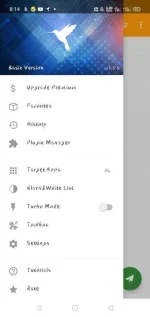
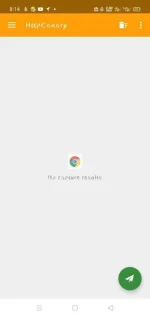
Step 3: Start mo ang pag-capture then open mo ang google chrome
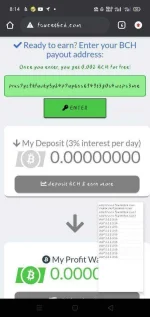
Step 4: icopy mo yung bch wallet and ipaste mo sa faucetbch

Step 5: kapag nandun kana sa dashboard mo i refresh mo sya or reload para ma capture mo ito " You do not have permission to view the full content of this post. Log in or register now." dapat yun ang hanapin mo
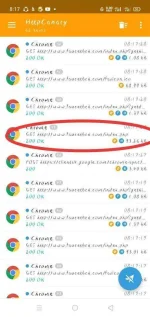
Step 6: Then pindutin mo yung " REQUEST " yung top-middle ng canary... dun mo makikita ang user-agent and phpsessid
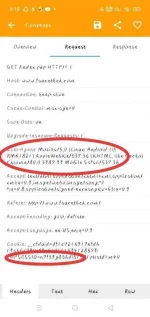
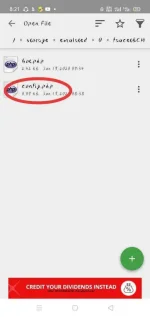
Step 7: kapag nahanap mo yung dalawa punta ka sa quickeditor buksan mo yung folder na faucetBCH then open mo yung config.php
Step 8: icopy and paste mo dun yung dalawa together with your bch wallet
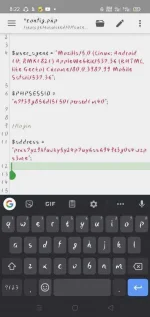
Step 9: kapag ok na save then punta kana sa termux type mo yung mga code na nasa taas
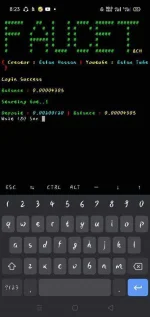
Step 10: wait ka nalang na mag collect na syang mag isa..... THATS IT...happy earnings mga kuya
*termux
*script
*http canary
*zarchiver
*quickeditor ( kahit anong .txt editor )
~termux code;
• apt update && apt upgrade
• pkg install php
• pkg install nano
• pkg install git
• cd /storage/emulated/0/(file location)
• ls
• php bot.php
script link
You do not have permission to view the full content of this post. Log in or register now.
Step 1: extract mo muna yung faucetBCH gamit ang zarchiver
Step2: open mo ang http canary and set target mo ang GOOGLE CHROME or Chrome
Step 3: Start mo ang pag-capture then open mo ang google chrome
Step 4: icopy mo yung bch wallet and ipaste mo sa faucetbch
Step 5: kapag nandun kana sa dashboard mo i refresh mo sya or reload para ma capture mo ito " You do not have permission to view the full content of this post. Log in or register now." dapat yun ang hanapin mo
Step 6: Then pindutin mo yung " REQUEST " yung top-middle ng canary... dun mo makikita ang user-agent and phpsessid
Step 7: kapag nahanap mo yung dalawa punta ka sa quickeditor buksan mo yung folder na faucetBCH then open mo yung config.php
Step 8: icopy and paste mo dun yung dalawa together with your bch wallet
Step 9: kapag ok na save then punta kana sa termux type mo yung mga code na nasa taas
Step 10: wait ka nalang na mag collect na syang mag isa..... THATS IT...happy earnings mga kuya