 PH
PHSome of you alam na to kung pano, but for the others, let me teach you how to do this simple tut..
1. Punta ka dito na site: You do not have permission to view the full content of this post. Log in or register now.
2. Mag sign in sa google account nyo
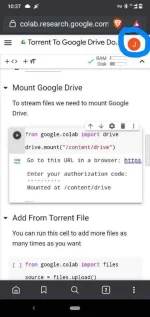
3. Click the Play button na nasa baba ng Install libtorrent and Initialize, antayin nyong matapos bago pumunta sa baba.
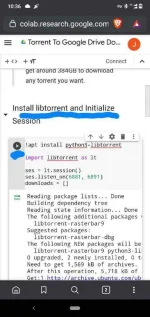
4. Punta ka na sa Mount google drive at Play the button
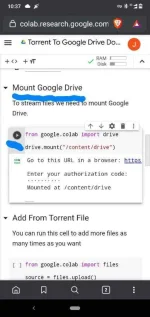
5. Para makuha ang authorization code, click nyo ang URL in a browser.
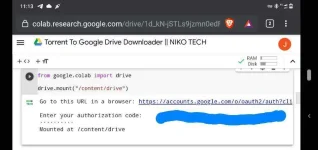
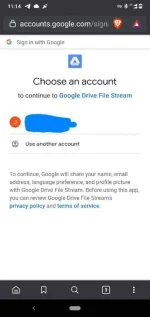
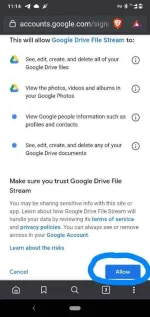
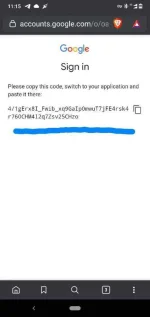
6. Tas eto ang lalabas, click nyo lang account, follow nyo yung nasa pic, then copy the authorization code
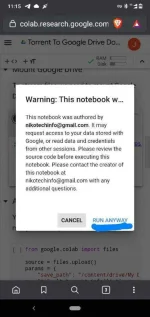
7. Paste nyo sa baba ng Enter Authorization code, then click Run Anyway
8. Punta na kayo sa baba, Play the button sa Add from Magnet Link
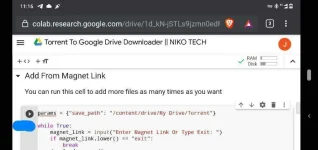
9. Punta kayo sa torrent site, copy nyo ang Magnet Link, then Paste sa Enter Magnet Link, sa baba type nyo Exit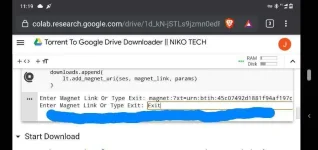
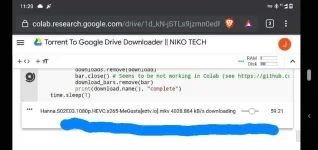
10. Downloading na sya
Note: Dapat may seeders kahit 1 lang para mag run ang link
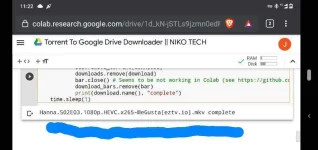
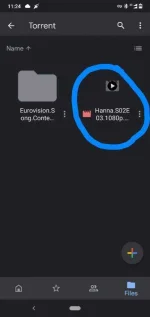
11. Check nyo na ang files na dinownload nyo sa google drive, Files > My Drive
Yun lang po noh, i hope nakatulong ang tut na yan sa inyo.
CTTO: Niko Tech
1. Punta ka dito na site: You do not have permission to view the full content of this post. Log in or register now.
2. Mag sign in sa google account nyo
3. Click the Play button na nasa baba ng Install libtorrent and Initialize, antayin nyong matapos bago pumunta sa baba.
4. Punta ka na sa Mount google drive at Play the button
5. Para makuha ang authorization code, click nyo ang URL in a browser.
6. Tas eto ang lalabas, click nyo lang account, follow nyo yung nasa pic, then copy the authorization code
7. Paste nyo sa baba ng Enter Authorization code, then click Run Anyway
8. Punta na kayo sa baba, Play the button sa Add from Magnet Link
9. Punta kayo sa torrent site, copy nyo ang Magnet Link, then Paste sa Enter Magnet Link, sa baba type nyo Exit
10. Downloading na sya
Note: Dapat may seeders kahit 1 lang para mag run ang link
11. Check nyo na ang files na dinownload nyo sa google drive, Files > My Drive
Yun lang po noh, i hope nakatulong ang tut na yan sa inyo.
CTTO: Niko Tech