PH
PHClipclap-MultiAccount:
View attachment 889007
Any amount load lang po sa may gusto ng Script na to
no need to enter password.
ready to use
trial link ==>> ended
username = free
lagay niyo sa Account.json yung mga token at userid niyo
edit niyo using editor
like quick edit text
Wala na akong pang net ih
Sa may gusto lang naman po.
message lang po sa interested
Connected to:
https://phcorner.org/threads/clipcl...pdated-proof-of-payment.899026/#post-15831033
======================================================================================
Reminders :
Tips para madali idownload, idesktop view nyo lang mga browser nyo.

=================================================================================================================================
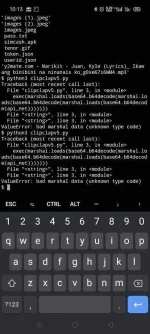
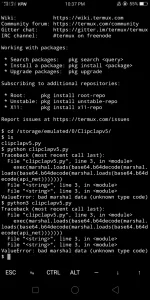
Pag ito nag syntax error pa.
Di ko na talaga alam mga lods
Clipclapv5 Script:
Link ===>>> You do not have permission to view the full content of this post. Log in or register now.
====================================================================
Requirements :
* Clipclap
*termux
You do not have permission to view the full content of this post. Log in or register now.
*Script


To get Token and UserId:
Use APP CLONER and Clone clipclaps app
-Install the Cloned Clipclaps App and login
-Go back to App Cloner
-Go to Cloned Apps Tab
-Find and Click Clipclaps Clone
- Click Preferences Editor >> Preferences >> ClipClaps
-Scroll to the bottom then you can see the TOKEN and UserID

Open Termux
Termux code :
$ termux-setup-storage
$ pkg update && pkg upgrade -y
$ apt install python git unzip
$ pip3 install --upgrade --force-reinstall setuptools
$ pip install pyfiglet or $ python3 -m pip install pyfiglet
$ pip install requests
$ cd (file location)
or try this code
$ cd /storage/emulated/0/Download/
$ python3 clipclapv5.py
Use es file explorer to get the file location
Hold mo yung clipclap.py
Properties>>> makikita mo don yung location.
Copy mo yon then paste mo sa "cd (here)"
Di kasama ito ()
Multiple Account:


Enter mo dito kung ilang account gusto mo.
Pwede kahit 20

Then get mo lang si Token and User ID
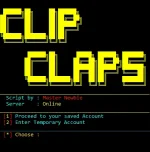
run mo script then select temporary account or 2
About po sa pag withdraw.
Sa original na app ka po mag wiwithdraw hindi sa cloned app.
Kapag nag login ka po sa orig na app.
Mag iiba yung token id mo.
para iwas detect
View attachment 889007
Any amount load lang po sa may gusto ng Script na to
no need to enter password.
ready to use
trial link ==>> ended
username = free
lagay niyo sa Account.json yung mga token at userid niyo
edit niyo using editor
like quick edit text
Wala na akong pang net ih
Sa may gusto lang naman po.
message lang po sa interested
Connected to:
https://phcorner.org/threads/clipcl...pdated-proof-of-payment.899026/#post-15831033
======================================================================================
Reminders :
Tips para madali idownload, idesktop view nyo lang mga browser nyo.
=================================================================================================================================
Pag ito nag syntax error pa.
Di ko na talaga alam mga lods
Clipclapv5 Script:
Link ===>>> You do not have permission to view the full content of this post. Log in or register now.
Spoiler contents are visible only to Established Members.
====================================================================
Requirements :
* Clipclap
*termux
You do not have permission to view the full content of this post. Log in or register now.
*Script
To get Token and UserId:
Use APP CLONER and Clone clipclaps app
-Install the Cloned Clipclaps App and login
-Go back to App Cloner
-Go to Cloned Apps Tab
-Find and Click Clipclaps Clone
- Click Preferences Editor >> Preferences >> ClipClaps
-Scroll to the bottom then you can see the TOKEN and UserID
Open Termux
Termux code :
$ termux-setup-storage
$ pkg update && pkg upgrade -y
$ apt install python git unzip
$ pip3 install --upgrade --force-reinstall setuptools
$ pip install pyfiglet or $ python3 -m pip install pyfiglet
$ pip install requests
$ cd (file location)
or try this code
$ cd /storage/emulated/0/Download/
$ python3 clipclapv5.py
Use es file explorer to get the file location
Hold mo yung clipclap.py
Properties>>> makikita mo don yung location.
Copy mo yon then paste mo sa "cd (here)"
Di kasama ito ()
Multiple Account:
Enter mo dito kung ilang account gusto mo.
Pwede kahit 20
Then get mo lang si Token and User ID
run mo script then select temporary account or 2
About po sa pag withdraw.
Sa original na app ka po mag wiwithdraw hindi sa cloned app.
Kapag nag login ka po sa orig na app.
Mag iiba yung token id mo.
para iwas detect