PH
PHDOWNLOAD YOUTUBE VIDEOS USING TERMUX
App needed - Termux app download it in playstore
Madali nalang mag download ng videos from youtube gamit ito mga paps.. follow nyo lang yung instructions and kung paano gamitin ...
INSTRUCTIONS:
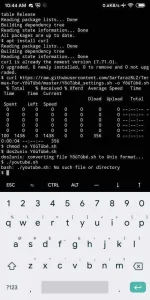
After nyo ma download yung termux open nyo then type this command one by one..
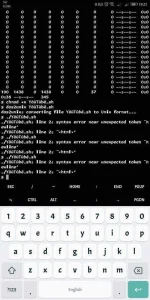
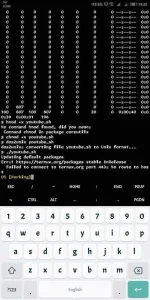
• apt update
• apt install curl
•curl You do not have permission to view the full content of this post. Log in or register now. -o youtube.sh
• chmod +x youtube.sh
• dos2unix youtube.sh
• ./youtube.sh
Note: small letters lang po lahat dito sa part na ito
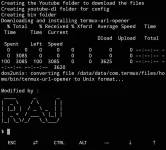
Wait nyo lang matapos ung installation malalaman nyo if tapos na kung may lumabas na na RAJ sa dulo ng installation.
After that just ..
Go to your youtube app.
Select the video you want to download.
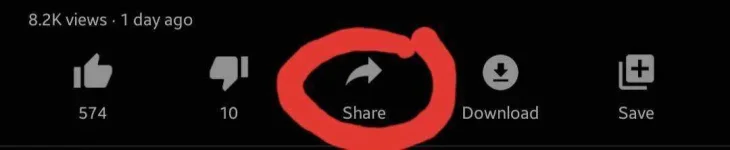
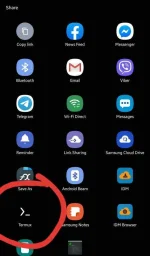
Click share then choose termux.
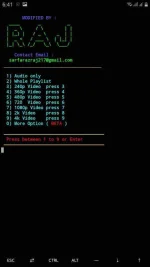
In termux app pede kayo pumili ng resolution ng video na gusto nyong idownload.
Type nyo lang yung number ng napili nyong resolution then hit enter.
Wait nyo lng matapos.
Thats it ...
Makikita nyo nga pala yung na-download nyo sa youtube folder sa internal storage nyo
Every time na magdadownload kayo just share youtube video to termux app then select resolution thats it
PWEDE RIN CONVERT YOUTUBE VIDEO TO MP3
Option 1 select nyo
Credit to the owner of the script
Download nyo nalang yung text file para sa command
App needed - Termux app download it in playstore
Madali nalang mag download ng videos from youtube gamit ito mga paps.. follow nyo lang yung instructions and kung paano gamitin ...
INSTRUCTIONS:
After nyo ma download yung termux open nyo then type this command one by one..
• apt update
• apt install curl
•curl You do not have permission to view the full content of this post. Log in or register now. -o youtube.sh
• chmod +x youtube.sh
• dos2unix youtube.sh
• ./youtube.sh
Note: small letters lang po lahat dito sa part na ito
./youtube.sh
Wait nyo lang matapos ung installation malalaman nyo if tapos na kung may lumabas na na RAJ sa dulo ng installation.
After that just ..
Go to your youtube app.
Select the video you want to download.
Click share then choose termux.
In termux app pede kayo pumili ng resolution ng video na gusto nyong idownload.
Type nyo lang yung number ng napili nyong resolution then hit enter.
Wait nyo lng matapos.
Thats it ...
Makikita nyo nga pala yung na-download nyo sa youtube folder sa internal storage nyo
Every time na magdadownload kayo just share youtube video to termux app then select resolution thats it
PWEDE RIN CONVERT YOUTUBE VIDEO TO MP3
Option 1 select nyo
Credit to the owner of the script
Download nyo nalang yung text file para sa command
You do not have permission to view the full content of this post. Log in or register now.

 //pastebin.com/raw/W1nvzN6q -O install.sh