PH
PHbanong_gang
Eternal Poster
3 USB flash disk ba gamit mo kada installer ng OS, isa para sa Windows 7 32 bit, isa para sa Windows 10 64, at isa sa Linux? Pag-isahin ang mga OS installer gamit itong program na ito.
Ventoy is an open source tool that can create bootable USB drive for ISO files. With ventoy, you don't need to format the disk again and again, you just need to copy the iso file to the USB drive and boot it. You can copy many iso files at a time and ventoy will give you a boot menu to select them (screenshot). Both Legacy BIOS and UEFI are supported in the same way. 260+ ISO files are tested (list).
A "Ventoy Compatible" concept is introduced by ventoy, which can help to support any ISO file plus customizing your boot menu.
FEATURES
-100% open source (license)
-Simple to use (Get started)
-Fast (limited only by the speed of copying iso file)
-Directly boot from iso file, no extraction needed
-Legacy + UEFI supported in the same way
-UEFI Secure Boot supported (1.0.07+) Notes
-Persistence supported (1.0.11+) Notes
-WIM files boot supported (Legacy + UEFI) (1.0.12+) Notes
-Auto installation supported (1.0.09+) Notes
-ISO files larger than 4GB supported
-Native boot menu style for Legacy & UEFI
-Most type of OS supported, 260+ iso files tested
-Not only boot but also complete installation process
-ISO files can be listed in List mode/TreeView mode Notes
-"Ventoy Compatible" concept
-Plugin Framework
-Readonly to USB drive during boot
-USB normal use unaffected
-Data nondestructive during version upgrade
-No need to update Ventoy when a new distro is released
Video Guide: Installing Ventoy plus adding theme (Remove Space sa link):
Code:
https://www.yout ube .com / watch?v= 3v2BXDzDTyMPano gamitin:
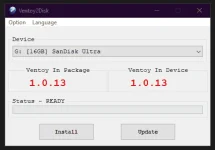
Isaksak ang USB flash disk sa compyuter at buksan ang Ventoy, click Install. (Siguraduhing ebackup ang laman ng USB nyo sapagkat itoy mabubura)
Adding ISO:
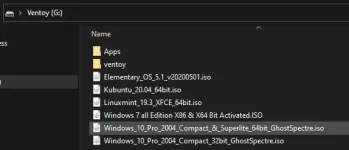
Just drag and drop or copy and paste any ISO into the Ventoy USB created disk, you can rename the ISO without any spaces, use underscore or dash when renaming it.
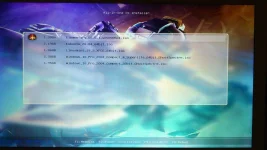
Kapag OK na, reboot nyo ang PC at eboot nyo ang Ventoy USB na ginawa mo.
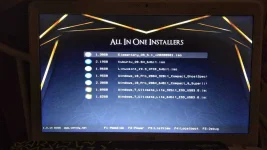
Ganito hitsura nya, kapag nilagyan ng theme (refer sa video guide above and the link)
You do not have permission to view the full content of this post. Log in or register now.
- Add GPT partition style support, see You do not have permission to view the full content of this post. Log in or register now.. For comparison between MBR and GPT see You do not have permission to view the full content of this post. Log in or register now.
- Add a Refresh button in Ventoy2Disk.exe
- Add a Clear Ventoy option in Ventoy2Disk.exe
- Add dir option in menu_class plugin, see You do not have permission to view the full content of this post. Log in or register now.
- Add dir option in menu_alias plugin, see You do not have permission to view the full content of this post. Log in or register now.
- Add autosel option in auto_install plugin, see You do not have permission to view the full content of this post. Log in or register now.
- Add autosel option in persistence plugin, see You do not have permission to view the full content of this post. Log in or register now.
- Change the property of Ventoy2Disk.exe, now it's NOT always topmost
- Fixed a bug when boot Windows/WinPE/Wim in UEFI mode with another active CDROM or USB-CDROM
- Optimization and bug fix for booting Parted Magic
- Optimization for booting Debian series distros
- Fixed a bug when boot.wim is in LZMS compression format
- New iso support
- elive_3.0.0_stable_hybrid.iso (Legacy) *
- Pardus-19.1-XFCE-amd64.iso (Legacy + UEFI) *
- debian-10.4.0-amd64-netinst.iso (Legacy + UEFI) *
- CDlinux-0.9.7.1.iso (Legacy) *
 Download You do not have permission to view the full content of this post.
Log in or register now..
Download You do not have permission to view the full content of this post.
Log in or register now.. Theme Section
Honeycomb Theme
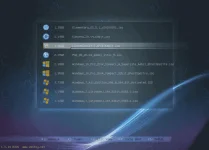
Vimix Theme
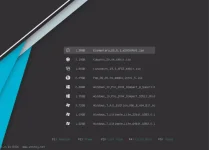
Litemint Theme
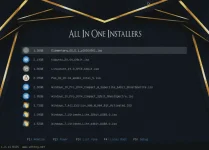
Theme Link (remove the space):
Code:
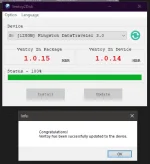
yout ube.com/watch?v=-j6kEoJjSk0How to Update: Isaksak lang ang USB, buksan ang latest version ng ventoy, Click Update, then Yes. Hindi mabubura ang mga ISO at files sa loob, uupdate nya lang into the latest version ng ventoy which is safe naman at hassle free.