 PH
PHEagleEye04
Eternal Poster
Review
Adobe CC GenP is Adobe product's universal ρá†ch which can activate almost every product of Adobe Creative Cloud 2019/2020.
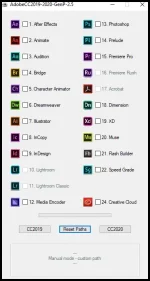
The following products can be activated:
- Adobe Acrobat DC 19.x (universal amtlib);
- Adobe After Effects CC 2019-2020;
- Adobe Animate CC 2019-2020;
- Adobe Audition CC 2019-2020;
- Adobe Bridge CC 2019-2020;
- Adobe Character Animator CC 2019-2020;
- Adobe Dimension CC v2.x (universal amtlib);
- Adobe Dreamweaver CC 2019-2020;
- Adobe Illustrator CC 2019-2020;
- Adobe InCopy CC 2019-2020;
- Adobe Indesign CC 2019-2020;
- Adobe Lightroom CC v2.2.1;
- Adobe Lightroom Classic 2019-2020;
- Adobe Media Encoder CC 2019-2020;
- Adobe Photoshop CC 2019- 2020;
- Adobe Prelude CC 2019-2020;
- Adobe Premiere Pro CC 2019-2020;
- Adobe Premiere Rush CC 2019-2020;
- Adobe XD 2019-2020;
- Adobe Muse CC 2018;
- Adobe Flash Builder 4.7 (64-bit);
- Adobe SpeedGrade CC 2015;
- Adobe Creative Cloud and Home Screen Fix.
Instructions on how to use:
- Disable anti-virus protection or add the ρá†ch to the AV's exclusions list before activation to prevent deletion and failure of activation procedure;
- It is recommended to install Adobe software after disconnecting the network;
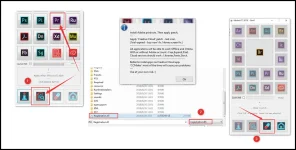
- After installing the Adobe software, run the ρá†ch to activate the software (Open "RunMe.exe");
- Click on the software icon to crack the Adobe product;
- Click the "Analyze" button (second button from the left in the last row - Magnifier/loupe icon);
- For instance: to crack the Adobe Premiere, click on the third icon in the fourth row and the ρá†ch will automatically find the software's local directory with the registration .dll file;
- Click the "ρá†ch" button to complete the activation procedure (third button from the left in the last row - Pill/medicine icon);
- Enjoy!
- Users can download all the Adobe apps by using Adobe Creative Cloud.
- With the fourth button (Home icon) user can return on the front page, and start cracking other Adobe software again.
- If Adobe software is installed in a different location (for instance non-C drive), use the "Custom Path" option to find the path with the relevant .dll file manually.
- With the "Adobe_2019_Home_Screen_FIX_v2.5.exe", the user can modify and fix Home screen error (Displayed question). Mostly the ρá†ch works without this step.
- For more information, click on the info button (first button from the left in the last row - letter i icon).
Spoiler: CHANGELOG:
Screenshots:
Virus free! 100% clean!
All credits go to HEVC & Team Project who made and shared the ac†ïvâ†ør with us!
Download link:
usersdrive
You do not have permission to view the full content of this post. Log in or register now.
