 PH
PH
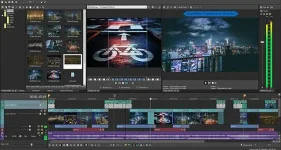
VEGAS Pro (successively experienced 3 owners: Sonic Foundry, SONY, and Magix Software from Germany) is a set of professional video editing software – integrates clipping, special effects, composition and streaming in one entity and makes them work at one stretch. So that for many professionals, it has transcended the Adobe Premiere Pro, and been challenging the status of Adobe After Effects.
As a professional Non Linear Editing (NLE) software, also an entry-level video editing software, VEGAS Pro is equipped with the professional Dolby Digital encoder and plug-in collection: FXHOME, NewBlueFX and iZotope. In addition, it also has powerful post-processing function, with which users can clip, composite, edit video materials at will.
VEGAS Pro’s unlimited video & audio track is a highlight feature that any other similar video editing software does not support. Moreover, in terms of special effects, it also provides the video composition, advanced coding, transitions, clipping, animation control, etc. Therefore, whether professional or personal user, you can profit from its simple operation interface. Anyhow, VEGAS Pro can be regarded as the efficient solution for digital video, streaming media, multimedia presentation, broadcast program, and so on.
// Key Features //
- Unparalleled video editing power
- Expanded edit mode
- Project interchange
- 4K support
- GPU acceleration
- Multi-format native editing
- Sync Link
- Multicamera editing
- Smart Proxy workflow
- Comprehensive S-log workflow
- Video effects and compositing
- Shape masking tools
- FX masking
- Color match
- OpenFX architecture
- LAB adjust and L*a*b* color space histogram
- Compositing modes
- Robust video plug-in architecture
- Create 3D projects as easily as 2D
- Powerful monitoring solutions
- Stereoscopic 3D adjustments
- Auto correct footage
- True stereoscopic 3D camera for 3D track motion compositing
- Integrated 3D adjustments
- Add depth to 2D elements
- Complete multitrack audio environment
- Surround sound mixing and encoding
- Extensive audio effects
- Audio event FX
- High-resolution audio support
- Broadcast Wave format support
- Input buses
- Multithreaded audio engine
- Envelope automation recording
- Import, export, and media management
- Project media tagging
- Native XAVC Support
- Easy capturing
- Capture to MXF from SD/HD-SDI devices
- Support for RAW photo files
- Streaming support for AVC/MP4 encoder
- DVD and Blu-ray Disc authoring
- Professional DVD layout and design
- Easy DVD preview
- 36 HD menu templates
- Buttons on video
- Extensive video and audio support
- DVD scripting
- Keyframes and transformation
- Exports chapter markers and subtitles to DVD Architect Pro software
for VEGAS Pro 17:
- Download and install VEGAS Pro 17, do not run program
- Copy the unlocked files to installation folder and overwrite
- Done
- Download and install the latest version of VEGAS Pro 16 from official site or AppNee
- Copy the v16.0.0.xxx universal unlocked file (Protein_x64.3.17.dll) to “C:\Program Files\VEGAS\VEGAS Pro 16.0\Protein\” and overwrite
- Done
*** The essence of this unlocked file ‘Protein_x64.3.17.dll’ is a universal API Level Emulator.
*** You can change the registration info by adding a registry value to the following key:
| [HKEY_CURRENT_USER\SOFTWARE\TEAM R2R\Protein Emulator] “Name”=”Sasami Sasasegawa” “SerialNumber”=”none!!!” |
LINKS
VEGAS 16 (535.2mb): You do not have permission to view the full content of this post. Log in or register now.
VEGAS 17 (686.9mb):You do not have permission to view the full content of this post. Log in or register now.
SOURCE: APPNEE

