🔒 Closed J A D E E Lightroom Presets - Anime Look

Status
Not open for further replies.
Abang abang sa mga post ko paps. Ang tagal na nung orange and teal style paps. Pero gawa ako para sayo 👍
 
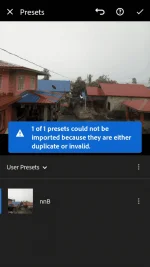
Import muna yung dng file tas click mo yung dng file go to presets save new preset yung may tatlong dots may optipn dun
 
[XX='Itachi03, c: 45580, m: 1468574'][/XX] punta ka sa Lighroom tapos diba pag magiimport ka kelangan mo pindutin yung image na may plus sign? ganun gagain mo sa dng saka pagkaimport mo may makikita ka copy settings tapos punta ka ngayon sa picture na gusto mo iedit tapos paste setiing lang
 
Status
Not open for further replies.

About this Thread

  • 39
    Replies
  • 2K
    Views
  • 26
    Participants
Last reply from:
Percival_1128

New Topics

Online now

Members online
1,142
Guests online
3,777
Total visitors
4,919

Forum statistics

Threads
2,301,160
Posts
29,141,199
Members
1,199,829
Latest member
jumpinglasonnn
Back
Top