 PH
PHA helpful tutorial for you!
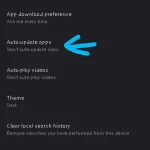
Disable auto-updates + Theme color +App download pref / clear recent search
Bonus tip: Diyan niyo rin po makikita ang change country + Google Play prefs. sa ibaba. (Step 3)
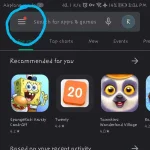
Step 1:
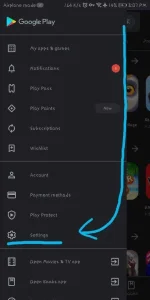
Step 2:
Step 3:
How to stop Playstore ρá†ch updates? (Not recommended)
You can cancel sa notif. bar or kapag not responsive, you can do this method:
Force close mo nalang kapag nag-uupdate, gawin sa Settings > apps.
Kapag hindi nakikita sa apps, ••• (more) > show system apps.
Thank you po sa iyong react. Feedback po!
Enjoy! <3
Renexto
Disable auto-updates + Theme color +App download pref / clear recent search
Bonus tip: Diyan niyo rin po makikita ang change country + Google Play prefs. sa ibaba. (Step 3)
Step 1:
Step 2:
Step 3:
How to stop Playstore ρá†ch updates? (Not recommended)
You can cancel sa notif. bar or kapag not responsive, you can do this method:
Force close mo nalang kapag nag-uupdate, gawin sa Settings > apps.
Kapag hindi nakikita sa apps, ••• (more) > show system apps.
Thank you po sa iyong react. Feedback po!
Enjoy! <3
Renexto
