 PH
PHMake amazing photos, from anywhere.

Adobe Photoshop Lightroom CC for mobile is a free app that gives you a powerful, yet simple solution for capturing, editing and sharing your photos. And you can upgrade for premium features that give you precise control with seamless access across all your devices – mobile, desktop and web.
Capture
•With the Lightroom CC professional capture mode, you will never miss a shot, and get the most out of your phone's camera.
•Capture with the DNG raw format for more creative control.
•Use the High Dynamic Range (HDR) mode to automatically expand the range of exposure, letting you capture the brightest to the darkest tones, and recreate the scene exactly as you saw it.
•Apply Photoshop magic with five specially formulated presets, that allow you to see the effect while you’re taking the shot, and fine tune the effect later. Non-destructive editing lets you always revert to your original.*
Edit
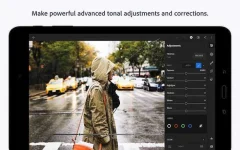
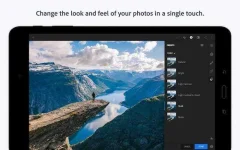
•Edit photos in seconds with tools that range from simple one-tap presets to powerful advanced adjustments and corrections.
•Make advanced edits with the tone curve to change color, exposure, tone, and contrast.
•Easily edit large albums and get consistent looks by copying your favorite edits across photos.
•Selectively adjust any part of a photo with your finger or stylus to apply enhancements with precision. (premium feature)
Organize
•Organize and manage your photos with tools like star ratings and flags.
•Search with ease. Adobe Sensei uses the power of artificial intelligence to auto-tag your photos based on what’s in them and where they were taken. (premium feature)
Store
•Use the Adobe Creative Cloud to back up your original photos and access them on other devices, as well as through Lightroom CC on the web (premium feature)
•Turn on Auto Add to automatically import your photos and synchronize them with Adobe Creative Cloud (premium feature)
Share
•Share photos to Instagram, Facebook, Twitter, Flickr, and more with the hashtag #lightroom.
•Lightroom CC web galleries enable you to easily showcase your photos online. Edits sync seamlessly, so any changes you make are always up-to-date. (premium feature)
*Shoot-through presets require OpenGL ES 3.0 and later support. The in-app camera is supported on Android smartphones.
**In keeping with stringent Adobe requirements around product quality and stability, full raw HDR capture mode is currently supported on devices that contain advanced processing and memory including Samsung S7, S7 Edge, S8, S8+, Note 8, Google Pixel, Pixel XL and OnePlus 5.
WHAT'S NEW
5.2
DOWNLOAD
5.2.2
You do not have permission to view the full content of this post. Log in or register now.
What's in the Mod?
All Premium features Unlocked
-RAW support
-Selective and Geometry Feature
-Cloud Sync (Currently not working)
Feedback and simple thanks will be appreciated
Adobe Photoshop Lightroom CC for mobile is a free app that gives you a powerful, yet simple solution for capturing, editing and sharing your photos. And you can upgrade for premium features that give you precise control with seamless access across all your devices – mobile, desktop and web.
Capture
•With the Lightroom CC professional capture mode, you will never miss a shot, and get the most out of your phone's camera.
•Capture with the DNG raw format for more creative control.
•Use the High Dynamic Range (HDR) mode to automatically expand the range of exposure, letting you capture the brightest to the darkest tones, and recreate the scene exactly as you saw it.
•Apply Photoshop magic with five specially formulated presets, that allow you to see the effect while you’re taking the shot, and fine tune the effect later. Non-destructive editing lets you always revert to your original.*
Edit
•Edit photos in seconds with tools that range from simple one-tap presets to powerful advanced adjustments and corrections.
•Make advanced edits with the tone curve to change color, exposure, tone, and contrast.
•Easily edit large albums and get consistent looks by copying your favorite edits across photos.
•Selectively adjust any part of a photo with your finger or stylus to apply enhancements with precision. (premium feature)
Organize
•Organize and manage your photos with tools like star ratings and flags.
•Search with ease. Adobe Sensei uses the power of artificial intelligence to auto-tag your photos based on what’s in them and where they were taken. (premium feature)
Store
•Use the Adobe Creative Cloud to back up your original photos and access them on other devices, as well as through Lightroom CC on the web (premium feature)
•Turn on Auto Add to automatically import your photos and synchronize them with Adobe Creative Cloud (premium feature)
Share
•Share photos to Instagram, Facebook, Twitter, Flickr, and more with the hashtag #lightroom.
•Lightroom CC web galleries enable you to easily showcase your photos online. Edits sync seamlessly, so any changes you make are always up-to-date. (premium feature)
*Shoot-through presets require OpenGL ES 3.0 and later support. The in-app camera is supported on Android smartphones.
**In keeping with stringent Adobe requirements around product quality and stability, full raw HDR capture mode is currently supported on devices that contain advanced processing and memory including Samsung S7, S7 Edge, S8, S8+, Note 8, Google Pixel, Pixel XL and OnePlus 5.
WHAT'S NEW
5.2
- Import Presets: Import the presets saved to your device or from connected online services such as Google Drivey
- Improved browsing experience for Inspiring Edits
- Improved playback of Interactive Tutorials
DOWNLOAD
5.2.2
You do not have permission to view the full content of this post. Log in or register now.
What's in the Mod?
All Premium features Unlocked
-RAW support
-Selective and Geometry Feature
-Cloud Sync (Currently not working)
Feedback and simple thanks will be appreciated
