PH
PH
D
Deleted member 1311328
APN Tricks GigaStories No Need VPN
Proxy
Deleted
Port
80
Pwede din sa WiFi
Notification Bar>Long Press WiFi>Long Press Connected Wifi>Proxy>Port>Save
Ganun lang kadali NO NEED VPN
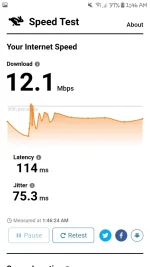
Using my 3g Network:
Fast and Stable
Update! Update! Update!
Pwede din siya sa Desktop, gamit ko sya ngayon try nyo.
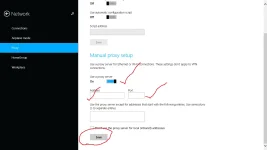
Punta kayo sa Setting>Network>Proxy>Enable nyo using "Use a Proxy Server" kung win10 or 8 ang gamit nyo> Ilagay ang proxy>Port and last, but not the least click Save!
And Yes! No need VPN!
Setting:
Proof:
Proxy
Deleted
Port
80
Pwede din sa WiFi
Notification Bar>Long Press WiFi>Long Press Connected Wifi>Proxy>Port>Save
Ganun lang kadali NO NEED VPN
Using my 3g Network:
Fast and Stable
Update! Update! Update!
Pwede din siya sa Desktop, gamit ko sya ngayon try nyo.
Punta kayo sa Setting>Network>Proxy>Enable nyo using "Use a Proxy Server" kung win10 or 8 ang gamit nyo> Ilagay ang proxy>Port and last, but not the least click Save!
And Yes! No need VPN!
Setting:
Proof: