 PH
CuadroPrince_789
Forum Guru
Sa mga naka anonyton dyan, lam ko marami na nakakaalam neto pero ishashare ko para sa mga hindi nakakalam.
1. Install anonytun
You do not have permission to view the full content of this post. Log in or register now.
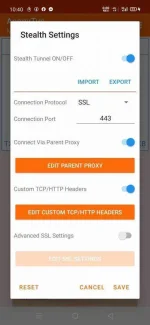
2. Open nyo den tap nyo ang s†éálth settings
3. Enable tunnel on/off
4. Connection protocol SSL
5. Connection port 443
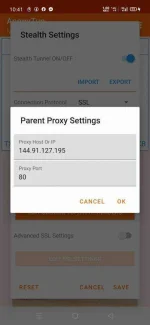
6. Enable edit parent proxy at buksan mo at lagay mo 2
Proxy host or ip: 144.91.127.195
Proxy port: 80
tap ok
7. Enabale mo ang edit custom tcp/http headers at open at tap mo yong editor ang delete mo ang nakalagay don at paste mo to
CONNECT [host_port]@www.weixin.qq.com [protocol][crlf]Host: www.weixin.qq.com[crlf]X-Online-Host: www.weixin.qq.com[crlf]X-Forward-Host: www.weixin.qq.com[crlf]X-Forwarded-For: www.weixin.qq.com[crlf]Connection: Keep-Alive[crlf]User-Agent: [ua][crlf][crlf]
8. Validate mo din save at save ulit at try mong ikonek.
Note: wag pumili ng server yong best performance lang.


1. Install anonytun
You do not have permission to view the full content of this post. Log in or register now.
2. Open nyo den tap nyo ang s†éálth settings
3. Enable tunnel on/off
4. Connection protocol SSL
5. Connection port 443
6. Enable edit parent proxy at buksan mo at lagay mo 2
Proxy host or ip: 144.91.127.195
Proxy port: 80
tap ok
7. Enabale mo ang edit custom tcp/http headers at open at tap mo yong editor ang delete mo ang nakalagay don at paste mo to
CONNECT [host_port]@www.weixin.qq.com [protocol][crlf]Host: www.weixin.qq.com[crlf]X-Online-Host: www.weixin.qq.com[crlf]X-Forward-Host: www.weixin.qq.com[crlf]X-Forwarded-For: www.weixin.qq.com[crlf]Connection: Keep-Alive[crlf]User-Agent: [ua][crlf][crlf]
8. Validate mo din save at save ulit at try mong ikonek.
Note: wag pumili ng server yong best performance lang.