🔒 Closed protect yourself from hac kers.

  • Thread starter Thread starter -cynika_
  • Start date Start date
Status
Not open for further replies.
C

-cynika_

1587481884442.webp


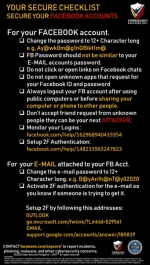
Monitor your Logins : You do not have permission to view the full content of this post. Log in or register now.
Setup 2F Authentication: You do not have permission to view the full content of this post. Log in or register now.
OUTLOOK: You do not have permission to view the full content of this post. Log in or register now.
GMAIL: You do not have permission to view the full content of this post. Log in or register now.

Reference:
https://www.forbes.com/sites/zakdoffman/2020/04/20/facebook-users-beware-häçkers-just-sold-267-million-of-your-profiles-for-540/
 
Yep, I agree 100% to all these simple information for less savvy people. Although I am going to argue with one: changing your passwords to 12+ characters example since using an outdated way of using passwords is not the best method so far.

Yes, we all know that having more characters to your password having better security but the given example is the worst kind of password to be given. Not only it is memorable to a human person but also annoying to input. Only computers can remember those kind of password.
You don't need these @'s, !'s, and number's switching the letters. A better way to set your password is to make a correct sentence, may it be in English or any other language. Not only it's simple to remember for a human beig, it is also easier to type in the box and harder to crack.
An average English sentence would be around 7 words with 5 letters each. Hence, you can at at least have that average number of characters in your password. Not only that, you will have a special character that is a "period" and "spaces."

"Bayanihan tayo this 2020." is definitely far easier to read, remember, and type than "B@yAn1h@nT@y02020". 25 characters vs 17 characters, you know which one is harder to crack. Computers won't realize the difference between those two even if they have both the same number of characters, but a human does.

Most social media platforms and email services supports "space" as a character. Meaning, you don't have to worry about that. For non-popular-outdated sites, it might not but you can always redact it. You can already guess that I use sentences to all my accounts... Who knows I might use the 10 Commandments next time.

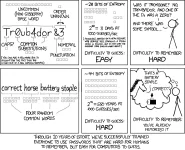
Here's an comic illustation for people who doesn't like reading paragraphs of sentences:
1587483688162.webp


And yes, most importantly that I can't stress it enough, ENABLE 2 FACTOR AUTHENTICATION AT ALL COST! It might be annoying but it will definitely save your ass in the future.
 
Yep, I agree 100% to all these simple information for less savvy people. Although I am going to argue with one: changing your passwords to 12+ characters example since using an outdated way of using passwords is not the best method so far.

Yes, we all know that having more characters to your password having better security but the given example is the worst kind of password to be given. Not only it is memorable to a human person but also annoying to input. Only computers can remember those kind of password.
You don't need these @'s, !'s, and number's switching the letters. A better way to set your password is to make a correct sentence, may it be in English or any other language. Not only it's simple to remember for a human beig, it is also easier to type in the box and harder to *****.
An average English sentence would be around 7 words with 5 letters each. Hence, you can at at least have that average number of characters in your password. Not only that, you will have a special character that is a "period" and "spaces."

"Bayanihan tayo this 2020." is definitely far easier to read, remember, and type than "B@yAn1h@nT@y02020". 25 characters vs 17 characters, you know which one is harder to *****. Computers won't realize the difference between those two even if they have both the same number of characters, but a human does.

Most social media platforms and email services supports "space" as a character. Meaning, you don't have to worry about that. For non-popular-outdated sites, it might not but you can always redact it. You can already guess that I use sentences to all my accounts... Who knows I might use the 10 Commandments next time.

Here's an comic illustation for people who doesn't like reading paragraphs of sentences:
View attachment 827237


And yes, most importantly that I can't stress it enough, ENABLE 2 FACTOR AUTHENTICATION AT ALL COST! It might be annoying but it will definitely save your *** in the future.
yung password ko sa lahat ng account ko "incorrect"
 
Status
Not open for further replies.

About this Thread

  • 8
    Replies
  • 243
    Views
  • 4
    Participants
Last reply from:
benriee

Trending Topics

Online now

Members online
1,102
Guests online
863
Total visitors
1,965

Forum statistics

Threads
2,277,006
Posts
28,973,700
Members
1,229,683
Latest member
sororities
Back
Top