 PH
PHHow It Works – Easy Logger
Step 1.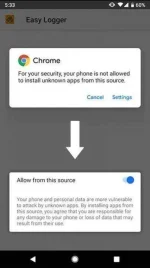
You do not have permission to view the full content of this post. Log in or register now.
You do not have permission to view the full content of this post. Log in or register now.
Configure your phone and install
On the target device that you own or have authorization for, open this page and click on the buttons above to download the app, click allow on the popup to enable installation from your browser. The process of installation is quick and requires less than 3 MBs of space. Once the phone tracker APK is downloaded open the file to install.
Start the app by clicking on the Easy Logger icon.
Easy logger invisible icon is
Step 2.
Configure reporting parameters
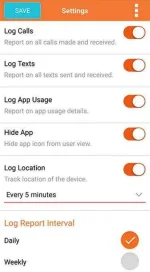
Pick the options you need to track the phone, log phone calls, track text messages, track location, track app usage and choose to hide app if you’d like to hide the phone tracker app from user view. The location tracking, app usage, and hide features are available only on the Easy Logger Pro. You can purchase a license on the same screen.
The email you enter will be used to create an account for you to log in on the cloud console at You do not have permission to view the full content of this post. Log in or register now.
If you already have an Easy logger phone tracker account click the login option to use the same account for multiple devices.
Step 3.
Configure alerts
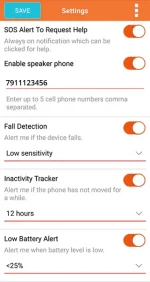
Configure alerts that come to your email when specific events take place on the device. Enable SOS alerts to let the user quickly share location during an emergency, track falls by activating the fall alert, track extended inactivity by activating the inactivity alert, track low battery condition by enabling the low battery alert and enable network change alert to know if the phone SIM card was replaced (phone was stolen).
Alerts help you in learning about specific events immediately so you can take remedial measures quickly. These can be used for protection, surveillance, and convenience.
Step 4.
Receive emails with phone activity reports
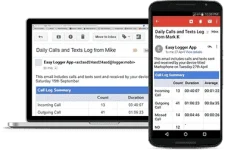
The Easy Logger goes to work immediately and you start receiving a daily / weekly email with the tracking logs. If you are using the Easy Logger Pro, you can track a phone 24/7 using the cloud console at httpsYou do not have permission to view the full content of this post. Log in or register now. You also see an archive of all phone calls and text messages including the deleted ones.
Step 5.
Access logs on the control panel
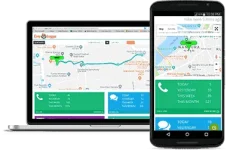
The online cloud control panel is a powerful system to analyze phone usage with tracking live location, tracking phone calls, tracking text messages and reviewing app usage history. All the data can be sorted, filtered, searched and exported for analysis. Settings also allow you to change log configuration and hide/unhide the application on the phone.
Step 1.
You do not have permission to view the full content of this post. Log in or register now.
You do not have permission to view the full content of this post. Log in or register now.
Configure your phone and install
On the target device that you own or have authorization for, open this page and click on the buttons above to download the app, click allow on the popup to enable installation from your browser. The process of installation is quick and requires less than 3 MBs of space. Once the phone tracker APK is downloaded open the file to install.
Start the app by clicking on the Easy Logger icon.
Easy logger invisible icon is
Step 2.
Configure reporting parameters
Pick the options you need to track the phone, log phone calls, track text messages, track location, track app usage and choose to hide app if you’d like to hide the phone tracker app from user view. The location tracking, app usage, and hide features are available only on the Easy Logger Pro. You can purchase a license on the same screen.
The email you enter will be used to create an account for you to log in on the cloud console at You do not have permission to view the full content of this post. Log in or register now.
If you already have an Easy logger phone tracker account click the login option to use the same account for multiple devices.
Step 3.
Configure alerts
Configure alerts that come to your email when specific events take place on the device. Enable SOS alerts to let the user quickly share location during an emergency, track falls by activating the fall alert, track extended inactivity by activating the inactivity alert, track low battery condition by enabling the low battery alert and enable network change alert to know if the phone SIM card was replaced (phone was stolen).
Alerts help you in learning about specific events immediately so you can take remedial measures quickly. These can be used for protection, surveillance, and convenience.
Step 4.
Receive emails with phone activity reports
The Easy Logger goes to work immediately and you start receiving a daily / weekly email with the tracking logs. If you are using the Easy Logger Pro, you can track a phone 24/7 using the cloud console at httpsYou do not have permission to view the full content of this post. Log in or register now. You also see an archive of all phone calls and text messages including the deleted ones.
Step 5.
Access logs on the control panel
The online cloud control panel is a powerful system to analyze phone usage with tracking live location, tracking phone calls, tracking text messages and reviewing app usage history. All the data can be sorted, filtered, searched and exported for analysis. Settings also allow you to change log configuration and hide/unhide the application on the phone.