 PH
PHPHC-CoronaV19
Forum Veteran
Good day mga lods, share share muna tayo habang may quarntine pa .
How do I use Google Assistant to send a message on WhatsApp without going online?
Google Assistant is activated by doing a long press on the home button or home icon of your phone. Hold the button down, and Google Assistant will ask you to speak the task you want it to execute.
After pressing the home button, the Assistant will ask of your request of which you will speak into your mobile device’s mouthpiece and dictate the name of the contact you wish to send a message to on WhatsApp.
For example, ‘send message to Mike Pictures on WhatsApp‘ as illustrated in the images below.
•After doing this, Google Assistant will ask you to also speak out loud the message you intend to send. Once you say your message. You then tell the assistant to ‘send‘ the message. And it is done!
By doing this your last seen remains unchanged from the last time you physically went online.
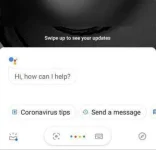
1. After long-pressing the home button, Google Assistant will ask you the task you intend for it to complete
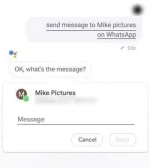
2. As mentioned before, you will have to say the name of the person you intend to send a message to. For example, as highlighted in the image above, ‘send message to Mike pictures’
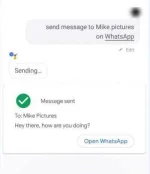
3. Once you are done dictating your message, now you can tell Google Assistant to send the message and it’s done.
How do I use Google Assistant to send a message on WhatsApp without going online?
Google Assistant is activated by doing a long press on the home button or home icon of your phone. Hold the button down, and Google Assistant will ask you to speak the task you want it to execute.
After pressing the home button, the Assistant will ask of your request of which you will speak into your mobile device’s mouthpiece and dictate the name of the contact you wish to send a message to on WhatsApp.
For example, ‘send message to Mike Pictures on WhatsApp‘ as illustrated in the images below.
•After doing this, Google Assistant will ask you to also speak out loud the message you intend to send. Once you say your message. You then tell the assistant to ‘send‘ the message. And it is done!
By doing this your last seen remains unchanged from the last time you physically went online.
1. After long-pressing the home button, Google Assistant will ask you the task you intend for it to complete
2. As mentioned before, you will have to say the name of the person you intend to send a message to. For example, as highlighted in the image above, ‘send message to Mike pictures’
3. Once you are done dictating your message, now you can tell Google Assistant to send the message and it’s done.