❓ Help Port scan attack

Status
Not open for further replies.

finzyditch

Fanatic
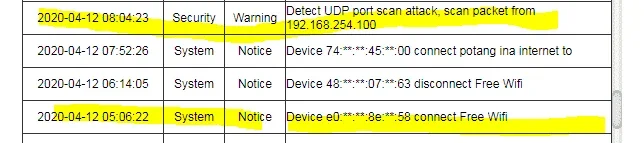
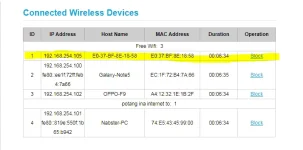
Good morning mga ka PH, nangyare lang eto ngayong araw pagkagising ko, na check ko meron naka connect na ibang unknown device which is ung naka yellow highlight sa pictures. Nagtataka ako baket siya nakapasok eh modified password ko naman ung password sa wifi namin at wala iba nakakaalam. Nag check ako ng history ng activities ng modem meron ako nakita "Detect UDP port scan attack". Sana may makatulong kung sino nakakaalam dito bago ko siya i bloblock kasi concern lang ako pano siya nakapasok sa Wifi namin. Marami salamat po at Keep safe everyone.
1586661403621.png
1586661441775.png
 

Attachments

  • 1586661441775.webp
    1586661441775.webp
    15.9 KB · Views: 21
Yung ip na 192.168.254.100 ay Galaxy Note 5, Could be torrents. Could also be legitimate port scans. They are super common and not much to worry about though
saken po yang galaxy note. ung unknown device lang ung pinakataas naka highlight ng yellow ung di ko alam cnu nakaconnect po. Pero kung hindi po siya aggressive attacker, marami salamat po napanatag lang loob ko, kinabahan lang ako baka meron attacker from net pede nakawin ung important data ko naka save sa PC.
 
saken po yang galaxy note. ung unknown device lang ung pinakataas naka highlight ng yellow ung di ko alam cnu nakaconnect po. Pero kung hindi po siya aggressive attacker, marami salamat po napanatag lang loob ko, kinabahan lang ako baka meron attacker from net pede nakawin ung important data ko naka save sa PC.
Nagto-torrent ka ba?
 
meron ako torrent file sa games un ( dragon nest ) pero tinigil ko kasi sobra laki ng files . Sinave ko lang siya sa downloaded files ko.
Due to torrenting din kasi minsan, Huawei ba yang modem mo? (525) A large number of institutions don't use Huawei products. I wouldn't worry about the scans you are seeing. There are other ways they will get your info
 
Due to torrenting din kasi minsan, Huawei ba yang modem mo? (525) A large number of institutions don't use Huawei products. I wouldn't worry about the scans you are seeing. There are other ways they will get your info

Noted po TS, yes huawei po siya 938. eto po kasi ung ginagamit ko kasi nagmura ung globe at home 999php lang. marami salamat
 
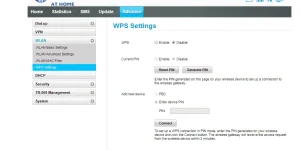
Pressing WPS button means granting device to connect to modem/router, kahit hindi mo alam or iba ang password, The device is automatically connected to the wireless network without entering the network password, nevertheless insecured protection
 
Basta alamm mo yung pin nyan tas naka on
Pressing WPS button means granting device to connect to modem/router, kahit hindi mo alam or iba ang password, The device is automatically connected to the wireless network without entering the network password, nevertheless insecured protection
alam ko po iyon yung tinutukoy ko yung sa router admin mismo na i oon tapos pag mag sscsn ka ng wifi may makikita ka sa baba ng SSID na Wps tas pag alam mo yung pin pwede mo mapasok thru Androdumper or Any Wps Connecter
 
Manual po siguro tawag don yung sa pipindutin pa ewan ko lang po kasi ganon saamin ih nahahäçked ko yung wifi ng kapit bahay namin thru wps kahit di pinipindot dun sa modem
 
Status
Not open for further replies.

About this Thread

  • 20
    Replies
  • 2K
    Views
  • 7
    Participants
Last reply from:
047

Trending Topics

Online now

Members online
1,177
Guests online
1,429
Total visitors
2,606

Forum statistics

Threads
2,273,447
Posts
28,949,561
Members
1,235,749
Latest member
hhu677
Back
Top