PH
PHtRickzterPH
Honorary Poster
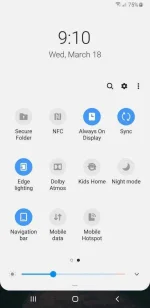
Hidden Mobile Data Toggle
1.Download files from here
a.https://developer.android.com/studio/releases/platform-tools (Choose proper file for your operating system)
b.https://developer.samsung.com/mobile/android-usb-driver.html (For other brand just search your phone drivers)
2. Install Samsung Drivers (to pc)
3. Extract SDK Platform Tools File (to pc)
4. Go to your phone "Settings" - "About phone" - "Software Information" - and tap "Build Number(7x)"
5. You should see "Developer Option" at settings
6. Click Developer option - Enable USB Debugging
7. Go to your pc ... Open SDK Platform Tools Folder
8. At top of folder paste this C:\Windows\System32\cmd.exe or just simply type cmd
9. Type this command:
adb devices <press enter>
adb shell <press enter>
settings put secure sysui_qs_tiles "$(settings get secure sysui_qs_tiles),MobileData,Hotspot" <press enter>
10. Done."Check you phone now" - Cheers!
1.Download files from here
a.https://developer.android.com/studio/releases/platform-tools (Choose proper file for your operating system)
b.https://developer.samsung.com/mobile/android-usb-driver.html (For other brand just search your phone drivers)
2. Install Samsung Drivers (to pc)
3. Extract SDK Platform Tools File (to pc)
4. Go to your phone "Settings" - "About phone" - "Software Information" - and tap "Build Number(7x)"
5. You should see "Developer Option" at settings
6. Click Developer option - Enable USB Debugging
7. Go to your pc ... Open SDK Platform Tools Folder
8. At top of folder paste this C:\Windows\System32\cmd.exe or just simply type cmd
9. Type this command:
adb devices <press enter>
adb shell <press enter>
settings put secure sysui_qs_tiles "$(settings get secure sysui_qs_tiles),MobileData,Hotspot" <press enter>
10. Done."Check you phone now" - Cheers!