PH
PHTUTORIAL 1/2: HUNT YOUR OWN PAYLOAD w/ SOCKSIP Tunnel
 MAIN REQUIREMENTS
1. Proper Internet Connection
2. PC / Mobile Internet Browser
3. SocksIP Tunnel: You do not have permission to view the full content of this post. Log in or register now.
4. Globe No Load Sim
5. Brain
You do not have permission to view the full content of this post. Log in or register now. SETUP SOCKSIP TUNNEL
You do not have permission to view the full content of this post. Log in or register now. PAYLOAD HUNTING MODE: TIP 1 – Simple Mode
You do not have permission to view the full content of this post. Log in or register now. PAYLOAD HUNTING MODE: TIP 2 – Advanced Mode (OPTIONAL)
NOTE 2: May SocksIP Tunnel Kana, May Payload Format, May Payload na, then CONGRATS! Need to remember dapat ang Remote DNS ni SocksIP ay 1.1.1.1;1.0.0.1 para hatay na hataw! Ang gagawin mo nalang chage-server ng change-server kada expired. Pag ayaw gumana change payload nalang ulit.

TUTORIAL 2/2: SSH SERVER w/ SHELLTUN
MAIN REQUIREMENTS
1. SocksIP Tunnel or Proper Internet
2. Internet Browser
3. Globe No Load Sim
4. ShellTun: You do not have permission to view the full content of this post. Log in or register now.
5. Brain
You do not have permission to view the full content of this post. Log in or register now. FIND YOUR SSH SERVER: Advanced Method

TIP: Find your best SSH SERVER para same settings nalang, pag na expire no need to change everything, just edit username and password. Yung alaga mong SSH SERVER same lang ng IP and SSH PORT for life yan!

</END>
</END>
</END>
You do not have permission to view the full content of this post. Log in or register now. You do not have permission to view the full content of this post. Log in or register now. You do not have permission to view the full content of this post. Log in or register now. NEED TO LEARN HOW TO GET SSH SERVER FOR BEGINNER?? : LEARN HERE! You do not have permission to view the full content of this post. Log in or register now. You do not have permission to view the full content of this post. Log in or register now. You do not have permission to view the full content of this post. Log in or register now.
FEED BACK IS A MUST TO IMPROVE ANYTHING. THANK YOU!
MAIN REQUIREMENTS1. Proper Internet Connection
2. PC / Mobile Internet Browser
3. SocksIP Tunnel: You do not have permission to view the full content of this post. Log in or register now.
4. Globe No Load Sim
5. Brain
You do not have permission to view the full content of this post. Log in or register now. SETUP SOCKSIP TUNNEL
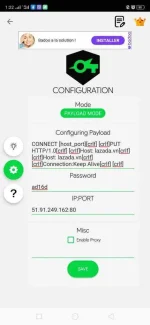
- Open SocksIP Tunnel & click ‘Gear Button’
- Click ‘Simple Mode’ & change to ‘Payload Mode’.
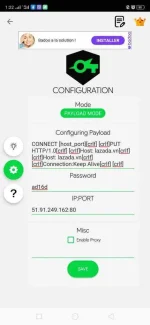
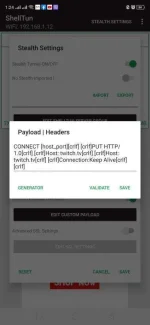
- Insert this payload layout & click save.
CONNECT [host_port][crlf] [crlf]PUT HTTP/1.0[crlf] [crlf]Host: twitch.tv[crlf] [crlf]Host: twitch.tv[crlf] [crlf]Connection:Keep Alive[crlf] [crlf]
- Click ‘Gold Crown’ logo above the SocksIP.
- Choose your preferred server & make sure not expired.
- Go Back and Click Settings ‘3-dots-above’
- Click Advance Config
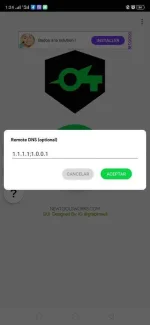
- Change Remote DNS to: 1.1.1.1;1.0.0.1
- Click Save / Aceptar
You do not have permission to view the full content of this post. Log in or register now. PAYLOAD HUNTING MODE: TIP 1 – Simple Mode
- Connect to Proper Internet
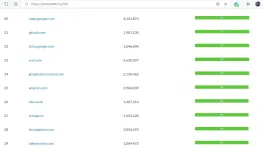
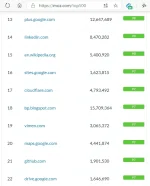
- Open Browser and think of any ‘keyword’ added by ‘list’. Sample I choose and googled ‘Top Websites Worldwide List”. (Sample: You do not have permission to view the full content of this post. Log in or register now. )
- Click the result website with the highest list poster, Choose unique one website from the list. I Choose ‘mozilla.org’
- Connect to GTM No Load SIM
- Open SocksIP Tunnel & Click ‘Gear Button’
- Change Payload ‘URL’ to ‘mozilla.org’ then click ‘Save’
- Your payload now should look like this
CONNECT [host_port][crlf] [crlf]PUT HTTP/1.0[crlf] [crlf]Host: mozilla.org[crlf] [crlf]Host: mozilla.org[crlf] [crlf]Connection:Keep Alive[crlf] [crlf]
- Click SocksIP Tunnel ‘Arrow Back’ & Click ‘Start’ to test if working Payload.
- BOOM! Connected with GTM No Load Sim! Congrats!
- IF NOT WORKING PAYLOAD, choose website again from the list, PS 40% from the list are working great!
You do not have permission to view the full content of this post. Log in or register now. PAYLOAD HUNTING MODE: TIP 2 – Advanced Mode (OPTIONAL)
- Connect to Proper Internet
- Open Browser and think of any ‘International Websites’. Sample I choose and googled ‘Lazada”. (Sample: lazada.com.ph )
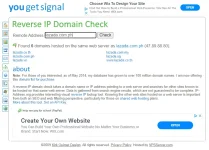
- Open Open Browser New Tab then open ‘Reverse IP Domain Check’: You do not have permission to view the full content of this post. Log in or register now.
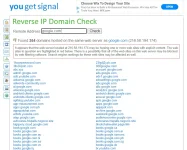
- Insert ‘lazada.com.ph’ on search bar and click ‘Check’ and you will see some domains found
- Connect to GTM No Load SIM
- Open SocksIP Tunnel & Click ‘Gear Button’
- Change Payload ‘URL’ to any domain from generated (Sample: Lazada.vn )
- Click ‘Save’
- Your payload now should look like this
CONNECT [host_port][crlf] [crlf]PUT HTTP/1.0[crlf] [crlf]Host: lazada.vn[crlf] [crlf]Host: lazada.vn [crlf] [crlf]Connection:Keep Alive[crlf] [crlf]
- Click SocksIP Tunnel ‘Arrow Back’ & Click ‘Start’ to test if working Payload.
- BOOM! Connected with GTM No Load Sim! Congrats!
- IF NOT WORKING PAYLOAD, choose website again from the generated list, PS 40% from the list are working great!
NOTE 2: May SocksIP Tunnel Kana, May Payload Format, May Payload na, then CONGRATS! Need to remember dapat ang Remote DNS ni SocksIP ay 1.1.1.1;1.0.0.1 para hatay na hataw! Ang gagawin mo nalang chage-server ng change-server kada expired. Pag ayaw gumana change payload nalang ulit.
TUTORIAL 2/2: SSH SERVER w/ SHELLTUN
MAIN REQUIREMENTS1. SocksIP Tunnel or Proper Internet
2. Internet Browser
3. Globe No Load Sim
4. ShellTun: You do not have permission to view the full content of this post. Log in or register now.
5. Brain
You do not have permission to view the full content of this post. Log in or register now. FIND YOUR SSH SERVER: Advanced Method
- The proper and fastest way to keep an SSH SERVER working with ShellTun is to make sure the server has the following:
1. With ‘Squid Proxy’ or ‘Free Proxy’ provided (VERY IMPORTANT)
2. With ‘OpenSSH’
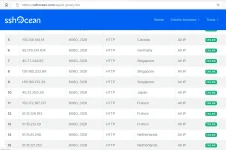
- There are lot of SSH Websites that are working, Yes all of them are working. Here are the list of the common ssh server providers.
1. You do not have permission to view the full content of this post. Log in or register now.
2. You do not have permission to view the full content of this post. Log in or register now.
3. You do not have permission to view the full content of this post. Log in or register now.
4. And more…..
- Visit vpnjantit
- Click ‘Get Free SSH’
- Choose any server, let’s choose ‘Singapore’
- Choose available server, Let’s choose ‘SSH SGGS 3’ with ‘Dropbear & OpenSSH’
- Click ‘Create SSH Account’
- Fill-up your username and Password and click ‘Create Account’
Username: euxjan6-vpnjantit.comPassword: euxjan6
Expiration Date: 2020-03-12 / 11:13:16
Location: Singapore
Max Login: 2 Devices
SSH Server: sggs3.vpnjantit.com
SSH Port: 22 (OpenSSH)
80 (Dropbear) Check port
Active Period: 2 Days - Open ShellTun
- Click Settings – 3-dots above
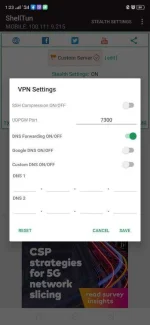
- Click VPN Settings
- Check Turn Green ‘DNS Forwarding On’
- Click Save
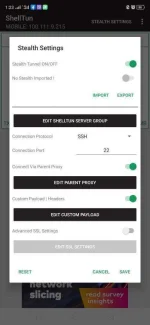
- Click ‘s†éálth Settings’
- Click ‘s†éálth Tunnel On’ to turn green on
- Choose ‘SSH’ under ‘Connection Protocol
- Use SSH PORT ‘22’ under Connection Port (from account generated)
- Click ‘Custom Payload’ and edit. Enter your Payload generated from ‘TUTORIAL 1/2: HUNT YOUR OWN PAYLOAD w/ SOCKSIP Tunnel’
- Click Save
- Click ‘Best Performance’
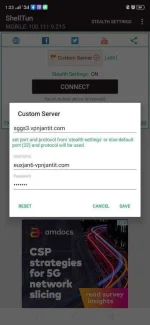
- Click Custom Server
- Enter ‘sggs3.vpnjantit.com’ as hostname (Account generated)
- Enter generated username and password.
- Click Save….
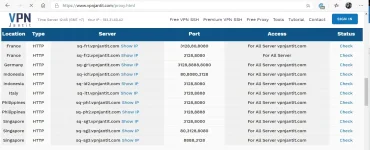
- Go back to vpnjantit and click ‘Free Proxy’ Link (Squid Proxy in other ssh websites)
- Look for ‘Singapore’ since we choose Singapore server.
- Choose one, then click ‘Check’ to check if it is open or online
- Look for ‘Open’ port (sample: 8000 – open, 3128 -closed)
- Copy the ‘server name’ and ‘open port’ sample….
Server: sq-sg1.vpnjantit.com
Open Port: 8000 - Go Back to click ‘s†éálth Settings”
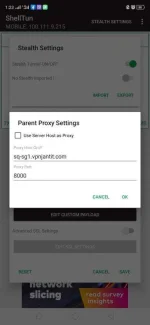
- Check Turn Green ‘Connect Parent Proxy’ and edit
- Under proxy host, put generated: sq-sg1.vpnjantit.com
- Under Proxy Port, put generated open port: 8000
- Click ‘Ok’
- Click ‘Save’
- Click ‘Connect’
- Done! You are now connected! Happy Browsing! You can choose different SSH SERVER with fast internet.
TIP: Find your best SSH SERVER para same settings nalang, pag na expire no need to change everything, just edit username and password. Yung alaga mong SSH SERVER same lang ng IP and SSH PORT for life yan!
ASK? WHAT IS THE BEST TO USE? SHELLTUN OR SOCKSIP TUNNEL?
* SOCKSIP (Upto 3-5mbps)
* ShellTun (Upto 25-50mbps)
- For direct server connection
- No connection interruption
Kaya depende sa need mo. I used Shelltun if downloading ako. Then pag no interruption activities Gamit ko SocksIP.
- Can use best and fastest server
- Sometimes with connection interruption
</END>
</END>
</END>
You do not have permission to view the full content of this post. Log in or register now. You do not have permission to view the full content of this post. Log in or register now. You do not have permission to view the full content of this post. Log in or register now. NEED TO LEARN HOW TO GET SSH SERVER FOR BEGINNER?? : LEARN HERE! You do not have permission to view the full content of this post. Log in or register now. You do not have permission to view the full content of this post. Log in or register now. You do not have permission to view the full content of this post. Log in or register now.
FEED BACK IS A MUST TO IMPROVE ANYTHING. THANK YOU!