🔒 Closed Blocked sites

Status
Not open for further replies.
How po ? Di po kasi ako it grad., ipagets mo po ako bahala mahintindi, sensia po

1583759027039.webp


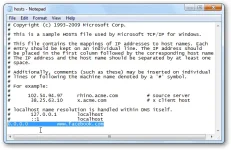
Use the following instructions if you’re running Windows 10 or Windows 8:

  1. Press the Windows key.
  2. Type Notepad in the search field.
  3. In the search results, right-click Notepad and select Run as administrator.
  4. From Notepad, open the following file:
    c:\Windows\System32\Drivers\etc\hosts
  5. Make the necessary changes to the file.
  6. Select File > Save to save your changes.
Windows 7 and Windows Vista
Use the following instructions if you’re running Windows 7 or Windows Vista:

  1. Select Start > All Programs > Accessories.
  2. Right-click Notepad and select Run as administrator.
    The Windows needs your permission UAC window appears.
  3. Click Continue to grant permission.
    Notepad opens.
  4. In Notepad, select File > Open.
  5. In the File name field, enter the following path:
    C:\Windows\System32\Drivers\etc\hosts
  6. Select Open.
  7. Make the necessary changes to the file.
  8. Select File > Save to save your changes.
Windows NT, Windows 2000, and Windows XP
Use the following instructions if you’re running Windows NT, Windows 2000, or Windows XP:

  1. Select Start > All Programs > Accessories > Notepad.
  2. Select File > Open.
  3. In the File name field, enter C:\Windows\System32\Drivers\etc\hosts.
  4. Select Open.
  5. Make the necessary changes to the file.
  6. Select File > Save to save your changes.
 
Status
Not open for further replies.

About this Thread

  • 3
    Replies
  • 349
    Views
  • 2
    Participants
Last reply from:
arsenal1205

Trending Topics

Online now

Members online
1,036
Guests online
727
Total visitors
1,763

Forum statistics

Threads
2,276,975
Posts
28,973,480
Members
1,229,674
Latest member
Mjivo
Back
Top