HELP! installing macOS High Sierra

Status
Not open for further replies.

ICE Coffee

⭐⭐☕⭐⭐
sino na po naka try mag install ng macOS sa PC? i mean nakpag install ng macOS sa ibang computer na hindi mac/apple?
paturo naman master, na try ko na yung mga tutorials kaso ang nangyayare mag stuck lang sya sa loading apple logo,

specs 👇
GIGABYTE H310M H 2.0
INTEL CORE i3 9th
8gb RAM

sana may maka tulong, TIA
 
If you're using a Enoch Bootloader
Verbose Boot muna, "-v" no boot args when installing ng Mac OS.

or

if clover uefi,
change boot args to -v only.

Also in terminal type this command.

date 0912160000
 
If you're using a Enoch Bootloader
Verbose Boot muna, "-v" no boot args when installing ng Mac OS.

or

if clover uefi,
change boot args to -v only.

Also in terminal type this command.

date 0912160000
sige po try ko to, tina-try ko pa kasi yung clover as of now, thanks sa reply
 
You do not have permission to view the full content of this post. Log in or register now.

1. gamit ka transmac para maging bootable

2. sundin mo lang itong settings ng bios .

Essentially, the BIOS (or UEFI) is the settings page for your computer’s motherboard. From here, you can fiddle with how your computer hardware works it is often necessary to change a few basic settings in the BIOS or UEFI to get macOS up and running.

The BIOS standard is usually used by motherboards from before 2012, while the UEFI standard is used by motherboards made after that.

To access BIOS / UEFI Setup, press and hold Delete on a USB Keyboard while the system is booting up

  • Load Optimized Defaults
  • If your CPU supports VT-d, disable it
  • If your system has CFG-Lock, disable it
  • If your system has Secure Boot Mode, disable it
  • Set OS Type to Other OS
  • If your system has IO SerialPort, disable it
  • Set XHCI Handoff to Enabled
  • If you have a 6 (Six) series or x58 system with AWARD BIOS, disable USB 3.0
tapos boot mo na .

advice ko lang wag ka mag dual boot kailangan separate ng hdd or ssd .
goodluck (y)
 
You do not have permission to view the full content of this post. Log in or register now.

1. gamit ka transmac para maging bootable

2. sundin mo lang itong settings ng bios .

Essentially, the BIOS (or UEFI) is the settings page for your computer’s motherboard. From here, you can fiddle with how your computer hardware works it is often necessary to change a few basic settings in the BIOS or UEFI to get macOS up and running.

The BIOS standard is usually used by motherboards from before 2012, while the UEFI standard is used by motherboards made after that.

To access BIOS / UEFI Setup, press and hold Delete on a USB Keyboard while the system is booting up

  • Load Optimized Defaults
  • If your CPU supports VT-d, disable it
  • If your system has CFG-Lock, disable it
  • If your system has Secure Boot Mode, disable it
  • Set OS Type to Other OS
  • If your system has IO SerialPort, disable it
  • Set XHCI Handoff to Enabled
  • If you have a 6 (Six) series or x58 system with AWARD BIOS, disable USB 3.0
tapos boot mo na .

advice ko lang wag ka mag dual boot kailangan separate ng hdd or ssd .
goodluck (y)
maraming salamat dito paps, try ko gamitin to
 
You do not have permission to view the full content of this post. Log in or register now.

1. gamit ka transmac para maging bootable

2. sundin mo lang itong settings ng bios .

Essentially, the BIOS (or UEFI) is the settings page for your computer’s motherboard. From here, you can fiddle with how your computer hardware works it is often necessary to change a few basic settings in the BIOS or UEFI to get macOS up and running.

The BIOS standard is usually used by motherboards from before 2012, while the UEFI standard is used by motherboards made after that.

To access BIOS / UEFI Setup, press and hold Delete on a USB Keyboard while the system is booting up

  • Load Optimized Defaults
  • If your CPU supports VT-d, disable it
  • If your system has CFG-Lock, disable it
  • If your system has Secure Boot Mode, disable it
  • Set OS Type to Other OS
  • If your system has IO SerialPort, disable it
  • Set XHCI Handoff to Enabled
  • If you have a 6 (Six) series or x58 system with AWARD BIOS, disable USB 3.0
tapos boot mo na .

advice ko lang wag ka mag dual boot kailangan separate ng hdd or ssd .
goodluck (y)
nagawa ko na kasi yung steps sa BIOS/UEFI kaso nag stuck na sya sa loading apple logo pagka boot
 
You do not have permission to view the full content of this post. Log in or register now.

1. gamit ka transmac para maging bootable

2. sundin mo lang itong settings ng bios .

Essentially, the BIOS (or UEFI) is the settings page for your computer’s motherboard. From here, you can fiddle with how your computer hardware works it is often necessary to change a few basic settings in the BIOS or UEFI to get macOS up and running.

The BIOS standard is usually used by motherboards from before 2012, while the UEFI standard is used by motherboards made after that.

To access BIOS / UEFI Setup, press and hold Delete on a USB Keyboard while the system is booting up

  • Load Optimized Defaults
  • If your CPU supports VT-d, disable it
  • If your system has CFG-Lock, disable it
  • If your system has Secure Boot Mode, disable it
  • Set OS Type to Other OS
  • If your system has IO SerialPort, disable it
  • Set XHCI Handoff to Enabled
  • If you have a 6 (Six) series or x58 system with AWARD BIOS, disable USB 3.0
tapos boot mo na .

advice ko lang wag ka mag dual boot kailangan separate ng hdd or ssd .
goodluck (y)
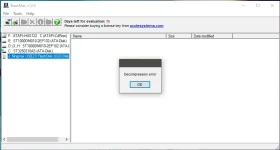
may error yung TransMac paps, pano kaya to?? :unsure:
1582959258263.webp
 
Status
Not open for further replies.

About this Thread

  • 69
    Replies
  • 1K
    Views
  • 8
    Participants
Last reply from:
banong_gang

Trending Topics

Online now

Members online
1,366
Guests online
1,650
Total visitors
3,016

Forum statistics

Threads
2,286,291
Posts
29,036,808
Members
1,217,866
Latest member
mickael8
Back
Top