🔒 Closed Help. How to fix my laptop

Status
Not open for further replies.
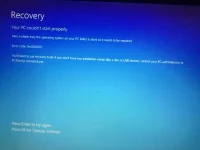
Help,help, paano po maayus ito.
IMG_20200223_195603.webp

Steps po pra marecover, i tried press f8 pero not working bumabalik sya sa ganyan
 
1st, try system restore if ever may restore point ka, normally windows creates restore point automatically

kung wala, gawa ka bootable windows 10 flashdrive, then upon installation screen, click mo "repair this pc"

kung ayaw padin after repair, instead na repair click mo,
"install" na and check "keep my files" para retained files mo

kung ayaw talaga then fresh install ka na ng windows 10 using flashdrive mo padin, wag mo na check "keep my files"
BUT DONT FORMAT your hardrive sa diskmanagement sa installation
para after fresh installation makikita mo padin files mo sa 'windows.old" folder

kung ayaw padin khit fresh install na, check mo na hardwares mo
 
Wag wag kang mag foformat unless na ransomeware unit mo, sayang yong mga files. Registry error or boot error lang po yan.

Eto po steps, tatlong kandila, kutsara, tsaka plangganang maliit. Tatawasin natin unit mo. Joke! Hehe

Prepare ka lang po ng:
• Flashdrive kahit 4gb
• Internet Connection
• Windows Media Creation Tool o kaya OS na same sa Current OS mo
• Rufus, in case na OS ang idownload mo.

Gawa ka lang ng bootable OS, after po nun syempre iboboot mo (1st boot or selected boot) mo yong Flashdrive. Kapag nasa Welcome screen ka na press and Hold mo lang SHIFT + F10, lalabas po CMD doon, pag labas ng cmd itype mo lang po itong mga ito:

bootrec.exe \fixmbr (tapos enter)
bootrec.exe \fixboot
bootrec.exe \scanos
bootrec.exe \rebuildbcd

Kapag ok po lahat at no errors, restart mo unit mo at ayun po, sana ayos na 👍
 
Wag wag kang mag foformat unless na ransomeware unit mo, sayang yong mga files. Registry error or boot error lang po yan.

Eto po steps, tatlong kandila, kutsara, tsaka plangganang maliit. Tatawasin natin unit mo. Joke! Hehe

Prepare ka lang po ng:
• Flashdrive kahit 4gb
• Internet Connection
• Windows Media Creation Tool o kaya OS na same sa Current OS mo
• Rufus, in case na OS ang idownload mo.

Gawa ka lang ng bootable OS, after po nun syempre iboboot mo (1st boot or selected boot) mo yong Flashdrive. Kapag nasa Welcome screen ka na press and Hold mo lang SHIFT + F10, lalabas po CMD doon, pag labas ng cmd itype mo lang po itong mga ito:

bootrec.exe \fixmbr (tapos enter)
bootrec.exe \fixboot
bootrec.exe \scanos
bootrec.exe \rebuildbcd

Kapag ok po lahat at no errors, restart mo unit mo at ayun po, sana ayos na 👍
Nce paps, try ko po yan. Thanks
 
reformat.... mga common error yang pag UEFI gamit mo, kung nag rereformat ako yung lumang Legacy partition style gamit ko kasi mag kocustomized at control ko yong PC ko. ano ba PC mo? at anong OS gamit mo?
 
Ganyan nangyari sa pc ng katrabaho ko, natry ko yung safemode, recovery, cmd commands, repair using usb boot drive. Yung hinala ko sa windows update yun, sabi nya kasi nag update ang windows before nagkaganun. Naapektohan ata yung file and folder permissions tapos may file na write-protected. Pag run ko ng chkdsk C: /f /r /x may file sya na di maccess kaya hindi successful, dahil may write protection. Ginawa ko yung attributes disk clear read-only na command pero unsuccessful pa rin. Kaya last resort ni reformat ko nalang hahaha. Pero nagbackup muna ako ng files nya. Matagal2x na din ako nag rereformat ng mga pc at laptop so may mga latest installers at latest windows iso kaya hindi na ako nagkaproblema hehe.
 
restart mo lang yan then hold shift or refer ka sa model ng laptop mo para makapasok sa bios yung iba kc need ng pin. then pagpunta sa recovery piliin mo yung advance recovery then reset mo. dalwang klase yan, reset without losing your files at remove everything and reinstall windows. piliin mo lang yung reset without losing your files f every meron ka important files.
 
Status
Not open for further replies.

Similar threads

About this Thread

  • 35
    Replies
  • 1K
    Views
  • 22
    Participants
Last reply from:
Ryecon

Trending Topics

Online now

Members online
577
Guests online
2,414
Total visitors
2,991

Forum statistics

Threads
2,277,349
Posts
28,975,980
Members
1,229,863
Latest member
jamesread
Back
Top