 PH
PHFirst of all this tutorial is for those who want to check if their memory is original or fake.
Sometimes we will buy things from the market/store with some require features or capabilities only to be disappointed that the thing actually is not what was advertised
or told by the sales person that they are. Memory card is not an exception, memory cards comes with class, UHS class and V class (maybe more) which determings their
capabilitys and quality.
There are series of tests to determined if they are really of their respective class, read and write speed etc.
Lets start!!
Things need;
1. Computer
2. Target SDCARD(Memory card)
3. h2testw (To get it just google "h2testw") or (just comment and i will send it to you)
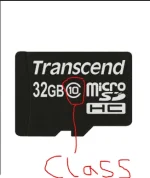
Before we start make sure you know the size and CLASS of your sdcard by looking at the back or on the package it was in.
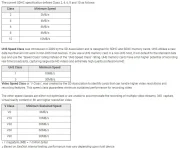
Look at this chart below to know the various CLASS and their respective READ/WRITE speed that we have.
a. Download the software "h2testw" only 213KB
b. insert the memory card in your computer through one of the following; memory reader, memory adaptor, USB modem with sdcard slot, some phones can mount sdcard but not
recommended.
c. Now run the software "h2testw"
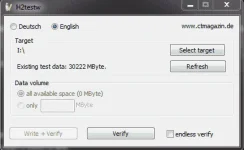
d. Select language, under "target" choose "select target", select the name of your sdcard
e. under 'data volume" select "all available space"
f. Finally click "write + verify"
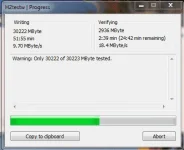
Note: This will fill your sdcard with raw data to check it read speed, write speed and to verify it capacity and thus making it full.
Note: Make sure you backup your files on the sdcard before you start if there is any.
Note: Time to fininsh depends on the capacity or size of your sdcard(memory card)
This what it will look like after finish;
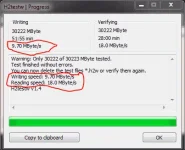
from the reults above i actually confirmed that my sdcard is 32GB which is CLASS 10 with read/write speed . Mine has write speed of 9.70mbyte/s or 10mbyte/s
and read speed of 18.0mbyte/s.
CONCLUTION!:
If after the test you have different result (usually below expectation) which is not located at the back of the sdcard or on the package of the sdcard, then
CONGRATULATION you have bought yourself a fake memory card.
Remember cheap sdcard comes with cheap and poor peformance.
After the test just reformat your sdcard and start using again.
Comment below if you have difficulties and i wiill help if am online.
Note: there are several ways to do this test with other softwares but this is my prefered software.
Sometimes we will buy things from the market/store with some require features or capabilities only to be disappointed that the thing actually is not what was advertised
or told by the sales person that they are. Memory card is not an exception, memory cards comes with class, UHS class and V class (maybe more) which determings their
capabilitys and quality.
There are series of tests to determined if they are really of their respective class, read and write speed etc.
Lets start!!
Things need;
1. Computer
2. Target SDCARD(Memory card)
3. h2testw (To get it just google "h2testw") or (just comment and i will send it to you)
Before we start make sure you know the size and CLASS of your sdcard by looking at the back or on the package it was in.
| CLASS | MINIMUN SPEED |
| 2 | 2MB/s |
| 4 | 4MB/s |
| 6 | 6MB/s |
| 8 | 8MB/s |
| 10 | 10MB/s |
Look at this chart below to know the various CLASS and their respective READ/WRITE speed that we have.
a. Download the software "h2testw" only 213KB
b. insert the memory card in your computer through one of the following; memory reader, memory adaptor, USB modem with sdcard slot, some phones can mount sdcard but not
recommended.
c. Now run the software "h2testw"
d. Select language, under "target" choose "select target", select the name of your sdcard
e. under 'data volume" select "all available space"
f. Finally click "write + verify"
Note: This will fill your sdcard with raw data to check it read speed, write speed and to verify it capacity and thus making it full.
Note: Make sure you backup your files on the sdcard before you start if there is any.
Note: Time to fininsh depends on the capacity or size of your sdcard(memory card)
This what it will look like after finish;
from the reults above i actually confirmed that my sdcard is 32GB which is CLASS 10 with read/write speed . Mine has write speed of 9.70mbyte/s or 10mbyte/s
and read speed of 18.0mbyte/s.
CONCLUTION!:
If after the test you have different result (usually below expectation) which is not located at the back of the sdcard or on the package of the sdcard, then
CONGRATULATION you have bought yourself a fake memory card.
Remember cheap sdcard comes with cheap and poor peformance.
After the test just reformat your sdcard and start using again.
Comment below if you have difficulties and i wiill help if am online.
Note: there are several ways to do this test with other softwares but this is my prefered software.
 thanks sa info

