 PH
PH-
Welcome to PHCorner Forums! Sign up for free to unlock full access and exclusive privileges, including:
- Asking questions about computer and mobile issues
- Discovering internet tips for your mobile network and computer
You are using an out of date browser. It may not display this or other websites correctly.
You should upgrade or use an alternative browser.
You should upgrade or use an alternative browser.
🌐 G·TM TunnelCat HTTP Puncher - Android/Windows/Linux
- Thread starter lfasmpao
- Start date
- Status
- Not open for further replies.
WORKAROUND TIP
Sa mga nakakapasok dito You do not have permission to view the full content of this post. Log in or register now. pero no browse , ganito gawin nyo restart nyo muna yung internet source nyo
Sa PC nyo open nyo yung CMD , right click " run as admin"
tapos type nyo to sa CMD ipconfig /flushdns then press enter ( may space between ipconfig and / )
pag success ito lalabas
Successfully Flushed the DNS resolver Cache
Next nyo gagawin sa PC nyo pa din go to SETTINGS > Network & Internet > Proxy > turn off automatically detect settings > Manual Proxy Setup > enable Use Proxy Server > type nyo sa baba Address 127.0.0.1 port 8888 then save.
Open nyo yung tunnelcat app run as admin , type credentials ( username / password ) then start.
try nyo muna mag refresh ng mag refresh lang , kung ayaw talaga palitan nyo apn nyo 2 lang apn ni Globe
internet.globe.com.ph
http.globe.com.ph
wag nyo modify yang default apn
Make sure na wala kayong subscription of free mb from GlobeSwitch
Sa mga nakakapasok dito You do not have permission to view the full content of this post. Log in or register now. pero no browse , ganito gawin nyo restart nyo muna yung internet source nyo
Sa PC nyo open nyo yung CMD , right click " run as admin"
tapos type nyo to sa CMD ipconfig /flushdns then press enter ( may space between ipconfig and / )
pag success ito lalabas
Successfully Flushed the DNS resolver Cache
Next nyo gagawin sa PC nyo pa din go to SETTINGS > Network & Internet > Proxy > turn off automatically detect settings > Manual Proxy Setup > enable Use Proxy Server > type nyo sa baba Address 127.0.0.1 port 8888 then save.
Open nyo yung tunnelcat app run as admin , type credentials ( username / password ) then start.
try nyo muna mag refresh ng mag refresh lang , kung ayaw talaga palitan nyo apn nyo 2 lang apn ni Globe
internet.globe.com.ph
http.globe.com.ph
wag nyo modify yang default apn
Make sure na wala kayong subscription of free mb from GlobeSwitch
WORKAROUND TIP
Sa mga nakakapasok dito You do not have permission to view the full content of this post. Log in or register now. pero no browse , ganito gawin nyo restart nyo muna yung internet source nyo
Sa PC nyo open nyo yung CMD , right click " run as admin"
tapos type nyo to sa CMD ipconfig /flushdns then press enter ( may space between ipconfig and / )
pag success ito lalabas
Successfully Flushed the DNS resolver Cache
Next nyo gagawin sa PC nyo pa din go to SETTINGS > Network & Internet > Proxy > turn off automatically detect settings > Manual Proxy Setup > enable Use Proxy Server > type nyo sa baba Address 127.0.0.1 port 8888 then save.
Open nyo yung tunnelcat app run as admin , type credentials ( username / password ) then start.
try nyo muna mag refresh ng mag refresh lang , kung ayaw talaga palitan nyo apn nyo 2 lang apn ni Globe
internet.globe.com.ph
http.globe.com.ph
wag nyo modify yang default apn
Make sure na wala kayong subscription of free mb from GlobeSwitch
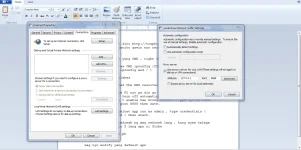 tama po ba ung ganyan?ilang beses ko na pong sinubukan negative pa rin sakin boss
oo pag ayaw lipat lang ako ng apn ok na , naka hotspot lang kasi ako sa smartphone kaya madali palitan ng apn , sa APN talaga nagkakatalo, dapat ang lalabas sa wifi mo " no internet " , as of now nakaka 17gb na ko in two days youtube streaming 1080pView attachment 781057tama po ba ung ganyan?ilang beses ko na pong sinubukan negative pa rin sakin boss
buti ka pa boss ako 2 araw ko na sinusubukan negative tlga sakin..pero pag hpi or svi ok nmn sakin..oo pag ayaw lipat lang ako ng apn ok na , naka hotspot lang kasi ako sa smartphone kaya madali palitan ng apn , sa APN talaga nagkakatalo, dapat ang lalabas sa wifi mo " no internet " , as of now nakaka 17gb na ko in two days YôùTùbé strêâmïng 1080p
Attachments
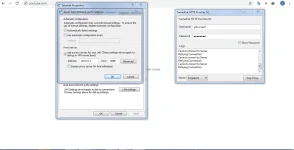

Recommended na wala dapat and naka turn off yung surfalertKailangan ba talaga walang balance yung sim? Stock lang kasi sa connecting to server. Nagawa kuna yung sa FAQs


jhefreylle
Established
sana ilabas na ang para sa android

jaythugtrecee
Fanatic
lan to wifi ba? triny ko sakin wifi to wifi d kakagat ung vpn
- Status
- Not open for further replies.
Similar threads
-
🖥️ PC App Sigma File Manager Modern Open-Source File Manager for Windows & Linux
- Started by crestfallenangel20
- Replies: 3
-
-
-
🛠️ Tools GitHub Store (Pwede sa Android, Windows, Linux, MacOS)
- Started by nodrhino
- Replies: 4
About this Thread
-
2KReplies
-
96KViews
-
459Participants
Last reply from:
zaii
zaii
New Topics
-
Unligo99 tiktok and no load gtm no blocking to our ρáíd vpn 50 a month
- Started by amber vpn
- Replies: 0
- 🌐 Globe & TM
-
5g Data AlLocation
- Started by Wretched
- Replies: 0
- 🌐 Globe & TM
-
Glne sub domain
- Started by Mrkgln
- Replies: 0
- 🌐 Globe & TM
-
-
Vless for netmod unlitoktik globibo patry po.Australia server
- Started by Drei69X
- Replies: 4
- 🌐 Globe & TM
-
Oct.5 v2ray ph go99+tiktok/gowatch/pc/android/ios
- Started by _-_-LhOnZ-_-_
- Replies: 3
- 🌐 Globe & TM
-
Globe and tm no load ,unligo99tiktok and more to our áíd vpn 50 a month
- Started by amber vpn
- Replies: 6
- 🌐 Globe & TM
-
Ph server malupit na vless config
- Started by ace0486
- Replies: 50
- 🌐 Globe & TM
-
Oct.4globe/GO99+unlitiktok/GOwatch/Android ios PC /ovpn/netmod/npv tunnel/
- Started by _-_-LhOnZ-_-_
- Replies: 10
- 🌐 Globe & TM
Trending Topics
-
-
-
Oct.2globe/GO99+unlitiktok/GOwatch/Android ios PC /ovpn/netmod/npv tunnel/
- _-_-LhOnZ-_-_
Replies: 11 -
-
Oct.4globe/GO99+unlitiktok/GOwatch/Android ios PC /ovpn/netmod/npv tunnel/
- _-_-LhOnZ-_-_
Replies: 10 -
-
-
-
-
Online now
- Members online
- 1,102
- Guests online
- 9,185
- Total visitors
- 10,287