PH
PHBladestorm
Journeyman
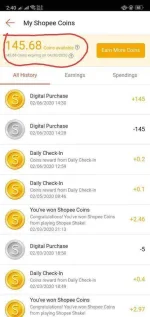
1. Go to Shopee app. Tap your coins and it should be like this. Check your expiring coins. 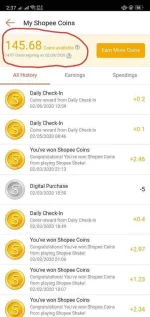
2. Back to Home Page and tap Load&eVoucher.

3. Tap Mobile load

4. Choose any. Anything will do.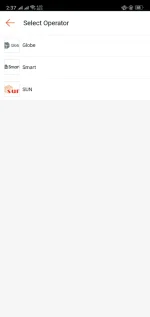
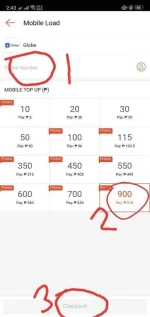
5. Type your number. Next is choose the highest mobile load. And checkout.
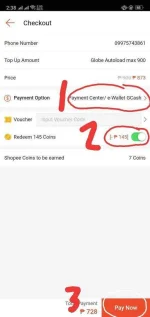
6. Switch your payment method to e-wallet GCash. Your can find it in remittance. Redeem all your shopee coins. Then tap pay now. (Dont worry as long as you follow this instructions , your gcash wallet will not credit)
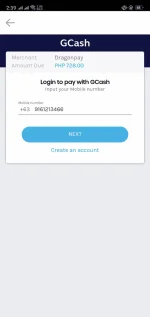
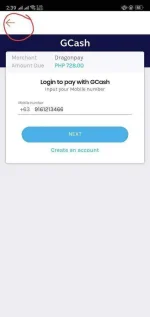
7. You will be redirected to gcash dragonpay. Just tap the back button.(PLEASE DO NOT TAP THE NEXT BUTTON OR ELSE YOU ARE DEAD)
8. Tap CANCEL ORDER.
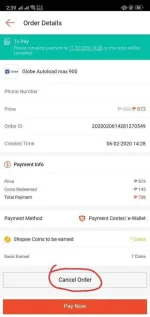
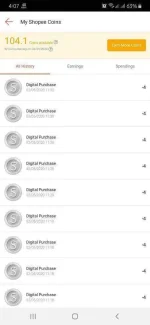
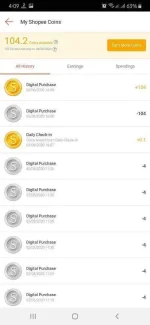
9. Once you've finish it. Go back to your shopee coins history. And there you have it. Extended 2 months of shopee coins expiration.
For more questions just drop by and I will answer it
 thank you and have a nice day.
2. Back to Home Page and tap Load&eVoucher.
3. Tap Mobile load
4. Choose any. Anything will do.
5. Type your number. Next is choose the highest mobile load. And checkout.
6. Switch your payment method to e-wallet GCash. Your can find it in remittance. Redeem all your shopee coins. Then tap pay now. (Dont worry as long as you follow this instructions , your gcash wallet will not credit)
7. You will be redirected to gcash dragonpay. Just tap the back button.(PLEASE DO NOT TAP THE NEXT BUTTON OR ELSE YOU ARE DEAD)
8. Tap CANCEL ORDER.
9. Once you've finish it. Go back to your shopee coins history. And there you have it. Extended 2 months of shopee coins expiration.
For more questions just drop by and I will answer it
thank you and have a nice day.