 PH
PH-
Welcome to PHCorner Forums! Sign up for free to unlock full access and exclusive privileges, including:
- Asking questions about computer and mobile issues
- Discovering internet tips for your mobile network and computer
You are using an out of date browser. It may not display this or other websites correctly.
You should upgrade or use an alternative browser.
You should upgrade or use an alternative browser.
🔒 Closed Cant connect to network
- Thread starter PHC_Blak
- Start date
- Status
- Not open for further replies.
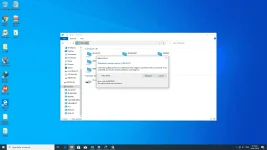
power on the windows desktop computer (otherwise network path was not found)
make sure you turn on sharing within the network (so that they can access) and also apply the same settings the other personal computers and turn off password protected sharing (do the same process to the other computer)
make sure you turn on sharing within the network (so that they can access) and also apply the same settings the other personal computers and turn off password protected sharing (do the same process to the other computer)
ICE Coffee
⭐⭐☕⭐⭐
try mo run gpedit.msc > computer config > administrative templates > network > lanman workstation > enable insecure guest logons baka sakali maka tulong sayo
ICE Coffee
⭐⭐☕⭐⭐
naka enable na ba yung SMB 1.0/CIFS Client ?? kung hindi pa search mo na lang sa google kung paano
done ayaw pa dinpower on the windows desktop computer (otherwise network path was not found)
make sure you turn on sharing within the network (so that they can access) and also apply the same settings the other personal computers and turn off password protected sharing (do the same process to the other computer)
paps pano e-enable ko po ba si lanman workstationtry mo run gpedit.msc > computer config > administrative templates > network > lanman workstation > enable insecure guest logons baka sakali maka tulong sayo
thanks nadali mo papstry mo run gpedit.msc > computer config > administrative templates > network > lanman workstation > enable insecure guest logons baka sakali maka tulong sayo
paps salamat po ng sobra kaninang umaga pa ako napako dito sa computer ko. pinalitan kasi ng bago unit ko.. salamat po talagatry mo run gpedit.msc > computer config > administrative templates > network > lanman workstation > enable insecure guest logons baka sakali maka tulong sayo
ICE Coffee
⭐⭐☕⭐⭐
nice!! maganda at nagawa mo problema mo, natutuwa ako sayopaps salamat po ng sobra kaninang umaga pa ako napako dito sa computer ko. pinalitan kasi ng bago unit ko.. salamat po talaga
sensya na sa abala sobrang salamat talaga kahapon ko pa ng maaga tinitira yan..nice!! maganda at nagawa mo problema mo, natutuwa ako sayo
hapon ko na nagawadahil sa tulong mo..
salamat talaga pasensya na newbie lang
ICE Coffee
⭐⭐☕⭐⭐
walang problema jan lodicake, tulungan lang tayo dito sa PHCsensya na sa abala sobrang salamat talaga kahapon ko pa ng maaga tinitira yan..
hapon ko na nagawadahil sa tulong mo..
salamat talaga pasensya na newbie lang
salamat po talaga po-format ko nga sana ulit e kasi ayaw talaga ginawa ko na lahat kahapon..walang problema jan lodicake, tulungan lang tayo dito sa PHC
thank you sssooooo mmmmuuuucccccchhhhhhh!!!!!


ICE Coffee
⭐⭐☕⭐⭐
haha!! you're welcome lodicake, keep learning and sharingsalamat po talaga po-format ko nga sana ulit e kasi ayaw talaga ginawa ko na lahat kahapon..
thank you sssooooo mmmmuuuucccccchhhhhhh!!!!!
^_^haha!! you're welcome lodicake, keep learning and sharing
paps.haha!! you're welcome lodicake, keep learning and sharing
pa help di nababasa yung CP ko sa windows 10

ano po kaya pwede sulusyon
ICE Coffee
⭐⭐☕⭐⭐
check mo yung CP mo baka kelangan pindotin mo yung sa connection nya, kasi minsan kelangan mo muna i confirm sa CP yung connection kung file transfer ba or imagespaps.
pa help di nababasa yung CP ko sa windows 10
ano po kaya pwede sulusyon
tapos na ayaw talaga e nag DL na ako ng android driver di talaga binabasa ng windows 10 pero sa kasama ko nababasa namancheck mo yung CP mo baka kelangan pindotin mo yung sa connection nya, kasi minsan kelangan mo muna i confirm sa CP yung connection kung file transfer ba or images
ICE Coffee
⭐⭐☕⭐⭐
hindi ko sure kung ano prob pag ganyan eh, try mo search sa googletapos na ayaw talaga e nag DL na ako ng android driver di talaga binabasa ng windows 10 pero sa kasama ko nababasa naman
ok thanks a lothindi ko sure kung ano prob pag ganyan eh, try mo search sa google
Paps Help!hindi ko sure kung ano prob pag ganyan eh, try mo search sa google
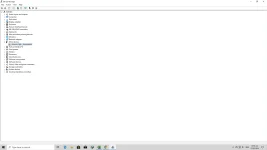
di nababasa yung phone ko kahit mag DL ako ng mga driver for MTP at android drivers
- Status
- Not open for further replies.
Similar threads
About this Thread
-
39Replies
-
888Views
-
4Participants
Last reply from:
PHC_Blak
PHC_Blak
New Topics
-
Calculator Emulator (Canon F789SGA I or II)
- Started by DDankii
- Replies: 0
- ❓ Computer Discussion & Support
-
Laptop Price for 2027
- Started by sisig with egg
- Replies: 0
- ❓ Computer Discussion & Support
-
Is this graphic card issue?
- Started by markjson
- Replies: 2
- ❓ Computer Discussion & Support
-
SoungHub No Sound Encountered
- Started by pow_tah
- Replies: 2
- ❓ Computer Discussion & Support
-
Apk to ipk any idea how to make it?
- Started by a s a r k a n a b a
- Replies: 1
- ❓ Computer Discussion & Support
-
TEMPORARY EMAIL NA HINDI NADEDETECT AS TEMPORARY EMAIL
- Started by 21banana
- Replies: 1
- ❓ Computer Discussion & Support
-
Looking for CSI ETABS Ultimate 2026 v23.2 Acïvâør
- Started by talaotep
- Replies: 0
- ❓ Computer Discussion & Support
-
I need help about my pc
- Started by lex2133
- Replies: 7
- ❓ Computer Discussion & Support
-
Start up boot so slow?
- Started by babyoriokiko
- Replies: 26
- ❓ Computer Discussion & Support
Trending Topics
Online now
- Members online
- 1,083
- Guests online
- 11,111
- Total visitors
- 12,194