 PH
PHNote: For ROOTED only.
Ultimate adblocker. Tried and tested by me. Doesn't block ads on youtube. Meron naman no ads version. Whole device adblocker kasama na ibang apps like mga vpn apps etc...
Steps:
1. Install lucky patcher. Link provided.
2. Open lucky patcher, grant root access.
3. Click toolbox.
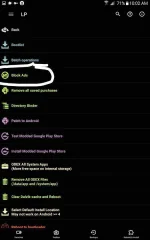
4. Click block ads.
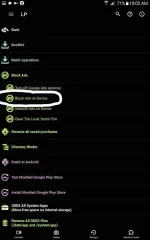
5. Click block device ads.
Kapag may toast message na host has been updated, succesfull na yun.
Pwede mo na uninstall ang lucky patcher.
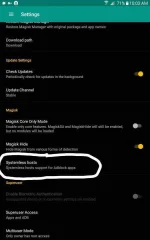
Kung kayo naman ay gumagamit ng magisk kailangan muna enable ang systemless host para mainstall ang adblocker.
Go to settings of magisk manager then check systemles host.
Tapos sundin mo na instalaltion ng adblocker via lucky patcher.
Link lucky patcher:
You do not have permission to view the full content of this post. Log in or register now.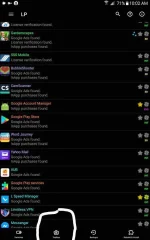
Dapat maging ganito ang /system/etc/hosts nyo
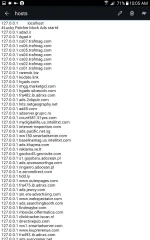
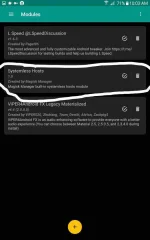
Ito naman sa magisk
Yan lang mga kaPHC. Enjoy adfree device!!!
Ultimate adblocker. Tried and tested by me. Doesn't block ads on youtube. Meron naman no ads version. Whole device adblocker kasama na ibang apps like mga vpn apps etc...
Steps:
1. Install lucky patcher. Link provided.
2. Open lucky patcher, grant root access.
3. Click toolbox.
4. Click block ads.
5. Click block device ads.
Kapag may toast message na host has been updated, succesfull na yun.
Pwede mo na uninstall ang lucky patcher.
Kung kayo naman ay gumagamit ng magisk kailangan muna enable ang systemless host para mainstall ang adblocker.
Go to settings of magisk manager then check systemles host.
Tapos sundin mo na instalaltion ng adblocker via lucky patcher.
Link lucky patcher:
You do not have permission to view the full content of this post. Log in or register now.
Dapat maging ganito ang /system/etc/hosts nyo
Ito naman sa magisk
Yan lang mga kaPHC. Enjoy adfree device!!!