PH
PHThis Tutorial Po is Base on My Experience☺
 First create account and Download The Ovpn Config.
(Tcpvpn.com)-sample site
NEXT:
save the account and open the .zip File Thru ES File Explorer Pro Mod
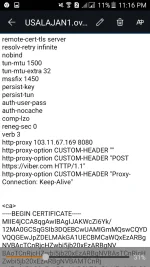
Extract The File And Open the .config Yung w/ 443 ...and click at Edit it Gaya ng nasa pic ☺
Here's the Payload For TU50 (Pero You Can Change It pa naman Depende sa Trip Mo)
THEN: Save it na Kung naka Modem Kayo Go To 192.168.8.1:8080 &
Login
Upload the file and save the username and password
And DONE! Meron ka ng sarili mo☺
*Kong Meron kayong Katanungan Or di nalinawanJust Drop Your comment☺
First create account and Download The Ovpn Config.(Tcpvpn.com)-sample site
NEXT:save the account and open the .zip File Thru ES File Explorer Pro Mod
Extract The File And Open the .config Yung w/ 443 ...and click at Edit it Gaya ng nasa pic ☺
Here's the Payload For TU50 (Pero You Can Change It pa naman Depende sa Trip Mo)
THEN: Save it na Kung naka Modem Kayo Go To 192.168.8.1:8080 &Login
Upload the file and save the username and password
And DONE! Meron ka ng sarili mo☺
*Kong Meron kayong Katanungan Or di nalinawanJust Drop Your comment☺
 between 1 am To 8 am You Can Create A Ph server po sa tcpvpn.com As soon As Di Pa puno ang Server☺ Thanks