❓ Help DI MA ENABLE B1 AT B28. HELP!

Status
Not open for further replies.

chattix1

Fanatic
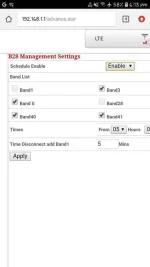
Mga boss may Idea ba kayo pano mag enable ng Band1 at Band28 sa modem ng PLDT Home Prepaid Wifi? parang naka lock kase ( Di ko ma-chec/Enable) parang automated ata pag enable niya kase minsan pagtingin ko sa Freq. Band ehh nka Band1 minsan...
see pict po
 

Attachments

  • Screenshot_20191225-181325_Chrome.webp
    Screenshot_20191225-181325_Chrome.webp
    26.3 KB · Views: 62
Bands 1 & 28 gets auto ticked close to midnight. Hoping to get someone's attention who knows how to get this force activated any time of the day - using fx-id3

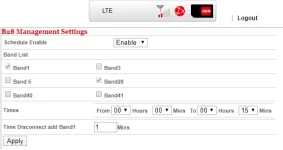
Yes, these get auto ticked close to midnight kase ang default dun sa "Times" field is 5:00 to 23:00, which means these are disable during the said period of time. To enable this any time of the day, try to change the "Times" field as shown below. Then, click Apply. Automatically, magtick na ung Band 1 and Band 28.

1585745408830.webp
 
Yes, these get auto ticked close to midnight kase ang default dun sa "Times" field is 5:00 to 23:00, which means these are disable during the said period of time. To enable this any time of the day, try to change the "Times" field as shown below. Then, click Apply. Automatically, magtick na ung Band 1 and Band 28.

View attachment 813406
I was just about to respond to your reply on my post! Yes, this does the trick. I'd say, put them all to zero, so there's no gap! Thank you, J4Jesse! :)
 
I was just about to respond to your reply on my post! Yes, this does the trick. I'd say, put them all to zero, so there's no gap! Thank you, J4Jesse! :)
Boss Juan_75 , I just have one problem, there are times na lumilipat siya sa Band 3 or 5 kahit hindi siya nakatick. Eh those bands pa naman are too slow sa location ko. Naexperience mo rin ba 'to?
 
Too lazy to type; quoting my own reply. See below, J4Jesse. I'd say you un-tick bands 5 and 3 altogether after you follow the instructions below.

"I had the same issue when I learned to set this frequency set-up manually. I believe it's your modem helping you still "get" signal from the tower due to its incapacity to receive a signal from Band 28.

What I did is, I took a very long extension cable, plugged in my modem, then placed my modem in every feasible corner where it can collect the signal.

Please note that I kept the frequencies locked to Bands 3 and 28 while scanning. By default, you will see Band 3 locked in the system. Then, after reaching RSRP of equal to or more than -100 AND SINR of over +5, keep it to where it's placed at that very moment, reboot your modem, and you should see the band change to Band 28 with better internet speed - at least this thing happened to me, may not be applicable to everyone."
 
Yes, these get auto ticked close to midnight kase ang default dun sa "Times" field is 5:00 to 23:00, which means these are disable during the said period of time. To enable this any time of the day, try to change the "Times" field as shown below. Then, click Apply. Automatically, magtick na ung Band 1 and Band 28.

View attachment 813406
Matic po na Activated yon boss? Band 1 and band 28.
 
Status
Not open for further replies.

About this Thread

  • 7
    Replies
  • 6K
    Views
  • 5
    Participants
Last reply from:
Mackits

Trending Topics

Online now

Members online
989
Guests online
859
Total visitors
1,848

Forum statistics

Threads
2,274,663
Posts
28,957,383
Members
1,233,393
Latest member
rentaro0927
Back
Top