PH
PHMarami kasing gumagamiit ng termux sa emulator medyo mabigat na at mabilis pa uminit yung PC
Using Terminal (Git Bash) makakahinga na ng maayos si PC
Basahin muna lahat ng steps bago mo simulan
requirements:
Git Bash (You do not have permission to view the full content of this post. Log in or register now.)
PHP (You do not have permission to view the full content of this post. Log in or register now.)
Steps:
Download PHP then extract yung file then rename yung foldter from "php-7.4.1-nts-Win32-vc15-x64" to "php"
Move mo yung "php" na folder sa C:\ directory
then seach mo sa windows yung "variables" and then open mo
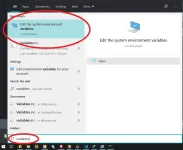
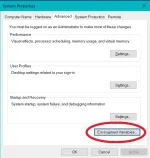
Click Environment Variables
Then Click mo yung "Path" sa system variables tapos click "New" then type mo yung path nag php folder mo "C:\php"
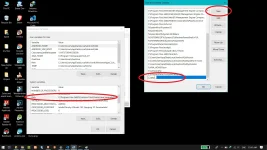
then click OK lahat para ma save
sa Git Bash naman, Download and Install mo lang yung application
(Git bash gamit ko kasi may mga script kasing need mong e clone sa mga repository)
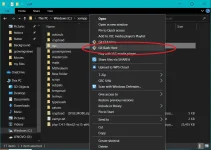
kung may existing ka Script kana right click yung folder then click "Git Bash Here"
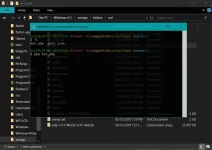
May Console na lalabas then pwede mo na execute yung script mo
example "php bot.php"
====================================================
kung may xampp kanang nka install asa PC mo Skip mo na yung pag download ng "PHP" at pag set ng Path, mag install ka nlng ng Git Bash
pwede rin mag execute ng Script sa CMD kung ayaw mo ng Git Bash
Using Terminal (Git Bash) makakahinga na ng maayos si PC
Basahin muna lahat ng steps bago mo simulan
requirements:
Git Bash (You do not have permission to view the full content of this post. Log in or register now.)
PHP (You do not have permission to view the full content of this post. Log in or register now.)
Steps:
Download PHP then extract yung file then rename yung foldter from "php-7.4.1-nts-Win32-vc15-x64" to "php"
Move mo yung "php" na folder sa C:\ directory
then seach mo sa windows yung "variables" and then open mo
Click Environment Variables
Then Click mo yung "Path" sa system variables tapos click "New" then type mo yung path nag php folder mo "C:\php"
then click OK lahat para ma save
sa Git Bash naman, Download and Install mo lang yung application
(Git bash gamit ko kasi may mga script kasing need mong e clone sa mga repository)
kung may existing ka Script kana right click yung folder then click "Git Bash Here"
May Console na lalabas then pwede mo na execute yung script mo
example "php bot.php"
====================================================
kung may xampp kanang nka install asa PC mo Skip mo na yung pag download ng "PHP" at pag set ng Path, mag install ka nlng ng Git Bash
pwede rin mag execute ng Script sa CMD kung ayaw mo ng Git Bash