PH
PHpaoloaztig
Merry Christmas !!!
Advance Merry Christmas mga Kasama !!!
Ilang araw na lang at magpa-Pasko na !!!
Eto po unang regalo ko para sa inyo !!!
Ituturo ko ngayon sa inyo kung paano mag setup ng malupet na KTR Config using SSL Method para sa GlobeTM Promo na may Free 1GB Facebook at Instagram at Sun TU Promo !!!
Tip: Mas malakas at mas mabilis pag KTR ang gagamitin natin kaysa Injector using SSL accounts. Tested ko na po yan !!!
Una kailangan natin ang KPN Tunnel Revolution (KTR) app...download nyo lang sa playstore...
 You do not have permission to view the full content of this post.
Log in or register now.
You do not have permission to view the full content of this post.
Log in or register now.
Eto po ang procedure...
1. Mag register po tayo ng SSL Account. Maraming available na SSL servers sa mga SSL/SSH sites na pwede kayong mag register. Sa ating tutorial gagawa tayo ng SSL account dito ... You do not have permission to view the full content of this post. Log in or register now. . Exclusive 1 month po ang mga servers na nandyan.
Eto halimbawa ng registered SSL account sa site na yan ...
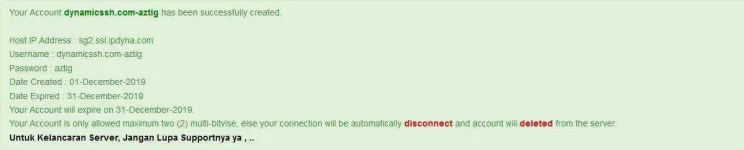
Bukod sa dynamicssh eto pang mga SSH/SSL sites na exclusive for 1 Month Accounts na pwede kayo mag register.
You do not have permission to view the full content of this post. Log in or register now.
You do not have permission to view the full content of this post. Log in or register now.
You do not have permission to view the full content of this post. Log in or register now.
May available din na mga 1 month SSL server sa iba't-ibang Ssh Sites. Paki Check nyo na lang...
2. Next, open natin ang ating KPN Tunnel Rev (KTR) app...
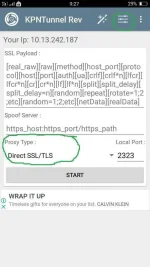
Sa Proxy type piliin natin ang DIRECT SSL/TLS at pagkatapos press natin ang 3 small horizontal lines na may dots. Paki tingnan lang ang larawan .
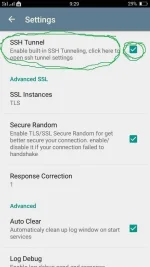
3. Ngayon nasa SETTING na tayo. Check natin yung small box at press natin ang SSH Tunnel.
4. Sa SSH Tunnel, input natin yung detail ng ginawa nating SSL account tulad ng nasa larawan.
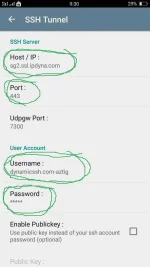
5. Scroll natin pababa at i-check ang Data Compression.
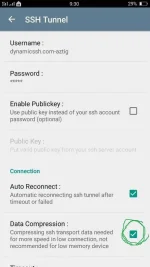
7. Scroll pa natin pababa at i-check naman ang Custom DNS. Pakitingnan lang ulit ang larawan.
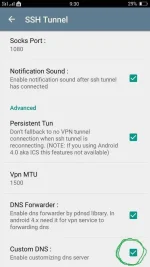
8. Ngayon balik tayo sa main menu ng ating KPN Tunnel Rev (KTR) app. Sa spoof server ilagay natin ang ating payload "clients3.google.com" without the quotes or any google-based payload para sa Globe at TM at "m.viber.com or aloha.viber.com" without the quotes para sa Sun TU at CTC Promo !!! Then press START !!! Congrats dahil siguradong connected ka na pag nasunod mo ng maayos ang ating tutorial !!!
Sana working sa inyo at sana nagustuhan nyo ang aking munting handog ngayong unang araw ng Pasko mga Kasama !!!

ENJOY
Ilang araw na lang at magpa-Pasko na !!!
Eto po unang regalo ko para sa inyo !!!
Ituturo ko ngayon sa inyo kung paano mag setup ng malupet na KTR Config using SSL Method para sa GlobeTM Promo na may Free 1GB Facebook at Instagram at Sun TU Promo !!!
Tip: Mas malakas at mas mabilis pag KTR ang gagamitin natin kaysa Injector using SSL accounts. Tested ko na po yan !!!
Una kailangan natin ang KPN Tunnel Revolution (KTR) app...download nyo lang sa playstore...
You do not have permission to view the full content of this post.
Log in or register now.Eto po ang procedure...
1. Mag register po tayo ng SSL Account. Maraming available na SSL servers sa mga SSL/SSH sites na pwede kayong mag register. Sa ating tutorial gagawa tayo ng SSL account dito ... You do not have permission to view the full content of this post. Log in or register now. . Exclusive 1 month po ang mga servers na nandyan.
Eto halimbawa ng registered SSL account sa site na yan ...
Bukod sa dynamicssh eto pang mga SSH/SSL sites na exclusive for 1 Month Accounts na pwede kayo mag register.
You do not have permission to view the full content of this post. Log in or register now.
You do not have permission to view the full content of this post. Log in or register now.
You do not have permission to view the full content of this post. Log in or register now.
May available din na mga 1 month SSL server sa iba't-ibang Ssh Sites. Paki Check nyo na lang...
2. Next, open natin ang ating KPN Tunnel Rev (KTR) app...
Sa Proxy type piliin natin ang DIRECT SSL/TLS at pagkatapos press natin ang 3 small horizontal lines na may dots. Paki tingnan lang ang larawan .
3. Ngayon nasa SETTING na tayo. Check natin yung small box at press natin ang SSH Tunnel.
4. Sa SSH Tunnel, input natin yung detail ng ginawa nating SSL account tulad ng nasa larawan.
5. Scroll natin pababa at i-check ang Data Compression.
7. Scroll pa natin pababa at i-check naman ang Custom DNS. Pakitingnan lang ulit ang larawan.
8. Ngayon balik tayo sa main menu ng ating KPN Tunnel Rev (KTR) app. Sa spoof server ilagay natin ang ating payload "clients3.google.com" without the quotes or any google-based payload para sa Globe at TM at "m.viber.com or aloha.viber.com" without the quotes para sa Sun TU at CTC Promo !!! Then press START !!! Congrats dahil siguradong connected ka na pag nasunod mo ng maayos ang ating tutorial !!!
Sana working sa inyo at sana nagustuhan nyo ang aking munting handog ngayong unang araw ng Pasko mga Kasama !!!
ENJOY