 PH
PHGood morning mga PHCitizens 
Share ko lang tong ginawa ko sa blog ko, nilagyan ko ng random post widget
To start, you need to download the script sa baba
Then,
Step 1, sa blog mo, dapat may few post na para mag effect to
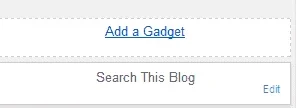
Go to Layout then Add a Gadget
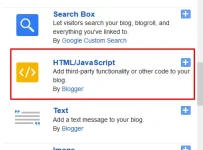
Step 2, add HTML/JavaScript
Step 3, Paste the code then Save
Reminders for adjusting your widget
{width:125px;height:250px;margin-right:12px;float:left;list-style:none;position:relative}
- Refers to the height of the post
#random-posts li img{width:125px;height:105px}
- Refers to the height of the image
var rdp_numposts = 5;
- Refers to the number of post
Ganito ang kinalabasan kung sa itaas ng body ng blog mo ilalagay

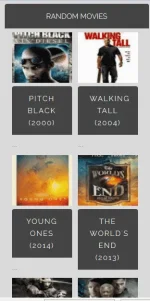
Ganito naman kapag sa side
Enjoy mga ka PHC
Tignan ang resulta -> You do not have permission to view the full content of this post.
Log in or register now.
Share ko lang tong ginawa ko sa blog ko, nilagyan ko ng random post widget
To start, you need to download the script sa baba
Then,
Step 1, sa blog mo, dapat may few post na para mag effect to
Go to Layout then Add a Gadget
Step 2, add HTML/JavaScript
Step 3, Paste the code then Save
Reminders for adjusting your widget
{width:125px;height:250px;margin-right:12px;float:left;list-style:none;position:relative}
- Refers to the height of the post
#random-posts li img{width:125px;height:105px}
- Refers to the height of the image
var rdp_numposts = 5;
- Refers to the number of post
Ganito ang kinalabasan kung sa itaas ng body ng blog mo ilalagay
Ganito naman kapag sa side
Enjoy mga ka PHC
Tignan ang resulta
-> You do not have permission to view the full content of this post.
Log in or register now.