 PH
PHjustthathappysmile
Forum Veteran
Sa mga gustong gumawa ng sariling config.
Follow niyo lang yung procedure.
First Download and Install Tunsafe You do not have permission to view the full content of this post. Log in or register now.
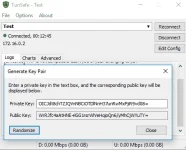
Run tunsafe punta kayo sa file then Generate Key Pair tapos randomize
Next punta kayo sa
You do not have permission to view the full content of this post. Log in or register now.
Tapos copy niyo script. tapos punta kayo sa pyton online editor
You do not have permission to view the full content of this post. Log in or register now.
Yung nacopy niyo na script, paste niyo lang sa pyton online editor then press Run
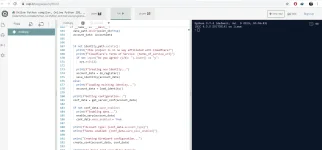
After pressing run, aask kayo ni online pyton editor if you agree, press Y then enter
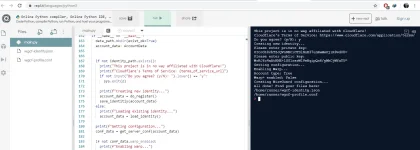
Mag ask ngayon siya ng private key. Balik ka ngayon sa tunsafe tapos Copy mo yung private key paste mo sa editor then press Enter.
Next hihingi naman siya ng Public key, Copy public key sa tunsafe, paste sa editor press Enter
Punta ka sa wgcf-profile.conf sa kaliwa ng editor then click mo, lalabas na yung config na ginawa mo. Copy mo lang sa notepad
save as "name na gusto niyo" with .conf sa dulo.
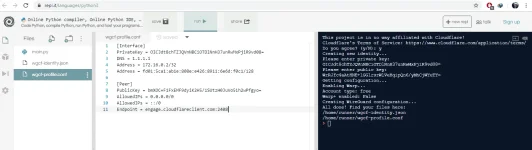
Import niyo lang sa wireguard/tunsafe then connect.
Credits sa gumawa ng script: ViRb3
Enjoy mga ka PHC. Pagsawaan niyo na hanggat buhay pa.
Add ko lang, dun sa mga di mapagana yung tunsafe, pwede kayo mag generate ng key gamit wireguard, Add empty tunnel lang kayo sa lower left. May lalabas na public saka private key.
Follow niyo lang yung procedure.
First Download and Install Tunsafe You do not have permission to view the full content of this post. Log in or register now.
Run tunsafe punta kayo sa file then Generate Key Pair tapos randomize
Next punta kayo sa
You do not have permission to view the full content of this post. Log in or register now.
Tapos copy niyo script. tapos punta kayo sa pyton online editor
You do not have permission to view the full content of this post. Log in or register now.
Yung nacopy niyo na script, paste niyo lang sa pyton online editor then press Run
After pressing run, aask kayo ni online pyton editor if you agree, press Y then enter
Mag ask ngayon siya ng private key. Balik ka ngayon sa tunsafe tapos Copy mo yung private key paste mo sa editor then press Enter.
Next hihingi naman siya ng Public key, Copy public key sa tunsafe, paste sa editor press Enter
Punta ka sa wgcf-profile.conf sa kaliwa ng editor then click mo, lalabas na yung config na ginawa mo. Copy mo lang sa notepad
save as "name na gusto niyo" with .conf sa dulo.
Import niyo lang sa wireguard/tunsafe then connect.
Credits sa gumawa ng script: ViRb3
Enjoy mga ka PHC. Pagsawaan niyo na hanggat buhay pa.
Add ko lang, dun sa mga di mapagana yung tunsafe, pwede kayo mag generate ng key gamit wireguard, Add empty tunnel lang kayo sa lower left. May lalabas na public saka private key.


