 PH
PHBurnAware Professional is a powerful CD, DVD and Blu-ray Disc burning and copying software intended for users who need maximum control over every aspect of the burning process and use multiple burners for mass-production of various discs and quick creation of disc-to-disc copies.
Burn
Benefits:
You can download a full version of BurnAware Free or evaluation versions of BurnAware Premium / Professional and try it for 10 days.
You can also download these files if you'd like to upgrade your product to the latest version or duwnload one of You do not have permission to view the full content of this post. Log in or register now..
BurnAware is a full-fledged, easy-to-use burning software which allows users to write all types of files such as digital photos, pictures, archives, documents, music and videos to CDs, DVDs and Blu-ray Discs. With BurnAware, you also be able to create bootable or multisession discs, high-quality Audio CDs and Video DVDs, make and burn ISO images, copy and backup discs, extract audio tracks, erase and verify data, recover data from multisession or unreadable discs.
Key Benefits
One of the most noticeable feature is an user interface – clean, effective, easy-to-use and multilingual. Another great benefits are low CPU usage while burning and very stable burning process. Plus support of latest OS – Windows 8.1, as well as any version starting from Windows XP, both 32 and 64 bits.
Advanced Options
Besides standard options, BurnAware offers many advanced options such as BOOT settings, UDF partition and versions, ISO levels and restrictions, session selection, CD-Text for track and disc, byte by byte verification, direct copying and many more.
Not sure which Edition?
Check out our comparison page and pick edition which is suitable for you.
 You do not have permission to view the full content of this post.
Log in or register now.
You do not have permission to view the full content of this post.
Log in or register now.
You do not have permission to view the full content of this post. Log in or register now.
You do not have permission to view the full content of this post. Log in or register now.
You do not have permission to view the full content of this post. Log in or register now.
Enjoy Burning.
Burn
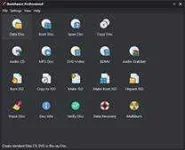
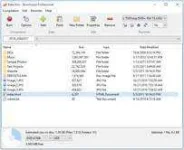
- Burn, backup or copy your files to CD, DVD or Blu-ray Discs.
Supports recording from command-line and BAT scripts for automating routine actions.
Supports CD-R/RW, DVD-R/RW, DVD+R/RW, BD-R/RE and DVD-RAM media, including high-capacity double-layer media.
Supports UDF (Universal Disc Format 1.02-2.60), Bridge and ISO9660 (Level 1-3, Romeo), including Joliet Unicode extensions. - Append or update Multisession discs.
Supports multisession for DVD-RW/+RW and import of any session. - Burn standard or boot disc images.
Supports ISO, CUE/BIN, BIN, NRG, IMG, DMG image files.
- Create Bootable CD or DVD. Use it as a very big floppy boot disc for recovery purposes.
El Torito creation support with advanced options: emulation type, sectors, platform, load segment and boot message. - Create Audio CDs. Play a CD on your traditional CD player or car stereo.
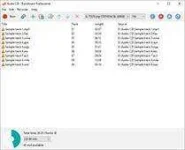
Supports mρ3, WAV, WMA, OGG, M4A, AAC and FLAC audio formats and M3U playlists.
Supports title and track CD-Text, including Unicode. - Create DVD-Video discs and mρ3 CDs/DVDs.
- Make standard or boot disc images.
Supports ISO and CUE/BIN image files.
Supports UDF (Universal Disc Format 1.02-2.60), Bridge and ISO9660 (Level 1-3, Romeo), including Joliet Unicode extensions.
- Copy disc to ISO image. This feature can be used for disc backup, as well as for disc copying.
- Copy CD, DVD or Blu-ray Discs. Make exact copies of your DVD-Video, Audio CD or standard Data discs.
- Erase. Erase or format rewritable disc.
- Verify. Check disc for read errors.
- Recover files. Extract files from different sessions, corrupted discs or extract audio tracks from Audio CDs.
- Multiburn. Write ISO image files to multiple recorders simultaneously.
Benefits:
- Lowest CPU usage while burning and copying
- Easiest-to-use, multilingual user interface
- On-the-fly burning
- Supports all types of optical drives and discs
- Uses the most fastest and stable burning engine
- Supports all major audio and disc image formats
- Does not require the .NET framework or additional drivers
- Supports Windows 8 and Windows XP/Vista/7 (both 32 and 64-bit)
You can download a full version of BurnAware Free or evaluation versions of BurnAware Premium / Professional and try it for 10 days.
You can also download these files if you'd like to upgrade your product to the latest version or duwnload one of You do not have permission to view the full content of this post. Log in or register now..
BurnAware is a full-fledged, easy-to-use burning software which allows users to write all types of files such as digital photos, pictures, archives, documents, music and videos to CDs, DVDs and Blu-ray Discs. With BurnAware, you also be able to create bootable or multisession discs, high-quality Audio CDs and Video DVDs, make and burn ISO images, copy and backup discs, extract audio tracks, erase and verify data, recover data from multisession or unreadable discs.
Key Benefits
One of the most noticeable feature is an user interface – clean, effective, easy-to-use and multilingual. Another great benefits are low CPU usage while burning and very stable burning process. Plus support of latest OS – Windows 8.1, as well as any version starting from Windows XP, both 32 and 64 bits.
Advanced Options
Besides standard options, BurnAware offers many advanced options such as BOOT settings, UDF partition and versions, ISO levels and restrictions, session selection, CD-Text for track and disc, byte by byte verification, direct copying and many more.
Not sure which Edition?
Check out our comparison page and pick edition which is suitable for you.
You do not have permission to view the full content of this post.
Log in or register now.- Burn your files to CD, DVD or Blu-ray Discs
- Append or update Multisession discs
- Create Bootable CD or DVD
- Create Audio CDs and MP3 discs
- Create DVD-Video discs
- Make standard or boot disc images
- Copy disc to ISO image
- Copy CD, DVD or Blu-ray Discs
- Erase or format rewritable disc
- Check disc for read errors
- Extract files from multisession or corrupted discs
- Write ISO to multiple recorders simultaneously
You do not have permission to view the full content of this post. Log in or register now.
You do not have permission to view the full content of this post. Log in or register now.
You do not have permission to view the full content of this post. Log in or register now.
Enjoy Burning.