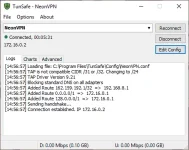
PH
PHZenKurtXhyle
Elite
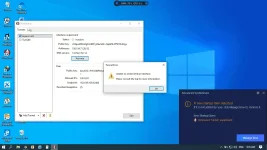
sa mga master diyan baka may alam kayo panu mafix to gamit ko windows 764bit...
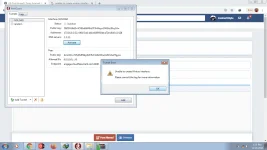
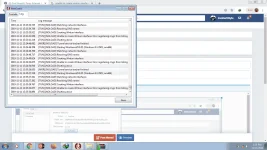
vps ka din?same error sakin tatlong pc talaga ayaw......win7 64bit OS ko........
boss penge configtry this app
You do not have permission to view the full content of this post. Log in or register now.
thanks dito master.. will try lateecopy mo lang ito
# This is a sample config file for TunSafe. It uses the same syntax as
# WireGuard's wg-quick tool
[Interface]
# The private key of this computer. This is a secret key, don't give it out.
# To convert it to a public key you can go to 'Generate Key Pair' in TunSafe.
PrivateKey = WCtYsvn21hQr5viWRn7Kyr6w3RVXPt51DdSkIwcyJVQ=
# Whether we want to bind a port to allow others to initiate connections to us.
# Please ensure this port is mapped in your router.
# Switch DNS server while connected
DNS = 116.50.176.113
# The addresses to bind to. Either IPv4 or IPv6. /31 and /32 are not supported.
Address = 156.154.71.26/32
# Whether to block all access to Internet that doesn't go through tunsafe.
# Note that Internet will keep being blocked even after TunSafe is restarted.
# Possible values (comma separated):
# route - Blocks all traffic using null route entries
# firewall - Blocks all traffic except TunSafe through the Windows firewall
# on - Uses the default block mechanism
# off - Turns off blocking
# BlockInternet = route, firewall
[Peer]
# The public key of the peer. Do not use the private key here. Use the 'Generate Key Pair'
# function in TunSafe to convert a private key to a public key.
PublicKey = bmXOC+F1FxEMF9dyiK2H5/1SUtzH0JuVo51h2wPfgyo=
# It's also possible to use a preshared key for extra security
# PresharedKey = SNz4BYc61amtDhzxNCxgYgdV9rPU+WiC8woX47Xf/2Y=
# The IP range that we may send packets to for this peer.
AllowedIPs = 0.0.0.0/0
# Address of the server
Endpoint = 162.159.192.9:2408
# Send periodic keepalives to ensure connection stays up behind NAT.
PersistentKeepalive = 25
salamat ng marami boss at sa lahat ng tumulong..copy mo lang ito
# This is a sample config file for TunSafe. It uses the same syntax as
# WireGuard's wg-quick tool
[Interface]
# The private key of this computer. This is a secret key, don't give it out.
# To convert it to a public key you can go to 'Generate Key Pair' in TunSafe.
PrivateKey = WCtYsvn21hQr5viWRn7Kyr6w3RVXPt51DdSkIwcyJVQ=
# Whether we want to bind a port to allow others to initiate connections to us.
# Please ensure this port is mapped in your router.
# Switch DNS server while connected
DNS = 116.50.176.113
# The addresses to bind to. Either IPv4 or IPv6. /31 and /32 are not supported.
Address = 156.154.71.26/32
# Whether to block all access to Internet that doesn't go through tunsafe.
# Note that Internet will keep being blocked even after TunSafe is restarted.
# Possible values (comma separated):
# route - Blocks all traffic using null route entries
# firewall - Blocks all traffic except TunSafe through the Windows firewall
# on - Uses the default block mechanism
# off - Turns off blocking
# BlockInternet = route, firewall
[Peer]
# The public key of the peer. Do not use the private key here. Use the 'Generate Key Pair'
# function in TunSafe to convert a private key to a public key.
PublicKey = bmXOC+F1FxEMF9dyiK2H5/1SUtzH0JuVo51h2wPfgyo=
# It's also possible to use a preshared key for extra security
# PresharedKey = SNz4BYc61amtDhzxNCxgYgdV9rPU+WiC8woX47Xf/2Y=
# The IP range that we may send packets to for this peer.
AllowedIPs = 0.0.0.0/0
# Address of the server
Endpoint = 162.159.192.9:2408
# Send periodic keepalives to ensure connection stays up behind NAT.
PersistentKeepalive = 25
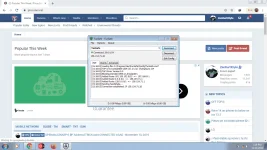
ganyan din sakin may error pag wireguard client gamit ko
Try mo to tunsafe same lang to sa wireguard
You do not have permission to view the full content of this post. Log in or register now.
tnx dito mastertry this app
You do not have permission to view the full content of this post. Log in or register now.
Anu to khit walang wifi? Coconect?salamat ng marami boss at sa lahat ng tumulong..
View attachment 726167
need parin ng wifi syempre pero kokonek siya kahit walang load..Anu to khit walang wifi? Coconect?
wai hakahapon ok na ok pag gamit ko nito sa pc.. ngayun bossss ZenKurtXhyle same na tayu ng problema, windows 10 64bit.... hahaha ngayung umaga lang di na makakonek kahit Tunsafe hehehe. Pero pero sa Cp ko connected ang WireG pero sa pc negative na... PHC-eftabs813 ano kaya prblema sa pc.. sa cp android ok naman
did you use na the config i gave you?kahapon ok na ok pag gamit ko nito sa pc.. ngayun bossss ZenKurtXhyle same na tayu ng problema, windows 10 64bit.... hahaha ngayung umaga lang di na makakonek kahit Tunsafe hehehe. Pero pero sa Cp ko connected ang WireG pero sa pc negative na... PHC-eftabs813 ano kaya prblema sa pc.. sa cp android ok naman