 PH
PHjamesiswizard_1
Elite
di nga.,.wala na.,?Wala narin HSS TCP at uSurf
di nga.,.wala na.,?Wala narin HSS TCP at uSurf
Sabe niladi nga.,.wala na.,?
Panic mode na din ako. Kakatamad naman dito sa cp ko. Hirap magtype.Di ako maka-connect kgbi hanggang kanina 6 AM. haysst.. Panic mode na ba? hehehe
Read the updates!
------------------------------------------------------------------------------------------------------Uploaded Old Configs on the 1st page.. check nyo lang sa mga nawalan ng config
Or eto..
Reupload ko kasi tinanggal ko yung unang inupload ko
PHCVPN v1.1
Features:
Bat file
- Low Ram
- Fixed servers (up to 5)
- Fast connect
- User Friendly
- Loaded with 3 old configs (fast configs = UDP)

PHC GUI

Instructions and Troubleshooting:
> To exit the openvpn.exe, just press F4
> You must install Tap adapter (if wala pa) tapos Run as Admin palagi (nasa 1st page ang PHC Tap Adapter natin)
> You must always run as admin the openvpn.exe application (Sa mga connection problems.. lalo na Windows 8 and 8.1)
To do that, just right click the openvpn.exe > Properties > Compatibility and...
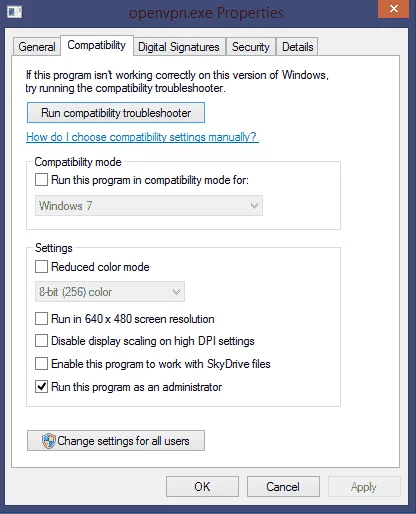
> To add more Servers (if naka snipe kayo)
Just rename it to .phc extension
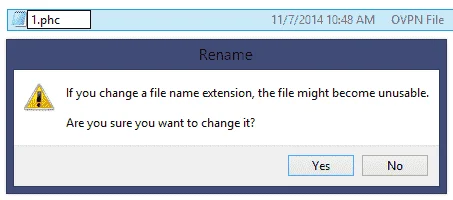
Note:
Rename your configs only with (yung naka bold dapat ang ilalagay nyo pag mag rename kayo)
Server 1 = 1.phc
Server 2 = 2.phc
Server 3 = 3.phc
Server 4 = 4.phc
Server 5 = 5.phc
> Also, modify PHCorner VPN CMD Edition.exe's compatibility
View attachment 27667
> Add nyo lang ang new servers sa "Servers" folder
------------------------------------------------------------------------------------------------------
Haha di ako makapag unblock ng sim using the unblocking methods meron pa ba kayong alam na trick? Di tuloy ako makaonline sa pc.

 unch:
unch:since na anounce ng mga telecom sa tv patrol na may capping na lahat ng net sa pinas. nag Beast mode na ang trams! ano beast mode din tayo?
Panic mode na din ako. Kakatamad naman dito sa cp ko. Hirap magtype.
di nga.,.wala na.,?
Di ako maka-connect kgbi hanggang kanina 6 AM. haysst.. Panic mode na ba? hehehe
since na anounce ng mga telecom sa tv patrol na may capping na lahat ng net sa pinas. nag Beast mode na ang trams! ano beast mode din tayo?

