 PH
PH-
Welcome to PHCorner Forums! Sign up for free to unlock full access and exclusive privileges, including:
- Asking questions about computer and mobile issues
- Discovering internet tips for your mobile network and computer
You are using an out of date browser. It may not display this or other websites correctly.
You should upgrade or use an alternative browser.
You should upgrade or use an alternative browser.
❓ Help Hito ulit ko !! na naghahanap ng makakatulong sakin plss (psiphon)
- Status
- Not open for further replies.
Try this Credit to xSilent
1st Part - Disable Auto Proxy
 edi wag mo gawing automatic set ang proxy just edit the registry
1st Part - Disable Auto Proxy
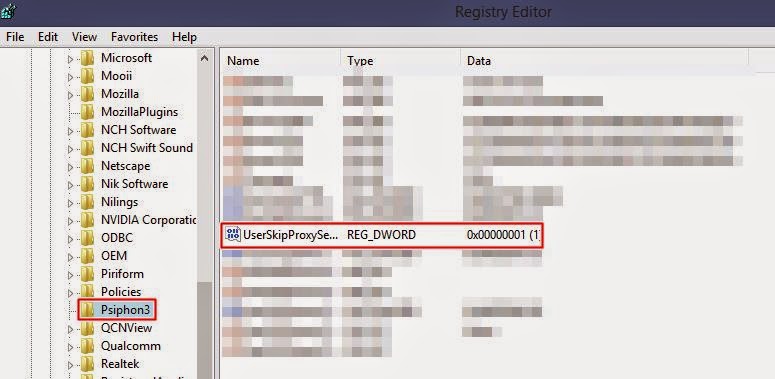
- Click Run, and type "regedit" to open the Registry Editor.
- Find and open "HKEY_CURRENT_USER\Software\Psiphon3", and on the right side you will see "UserSkipProxySettings".
- Set this value to 1 and Psiphon 3 will not automatically configure the system proxy settings.
- Press Start
- Click RUN
- Search for "regedit"
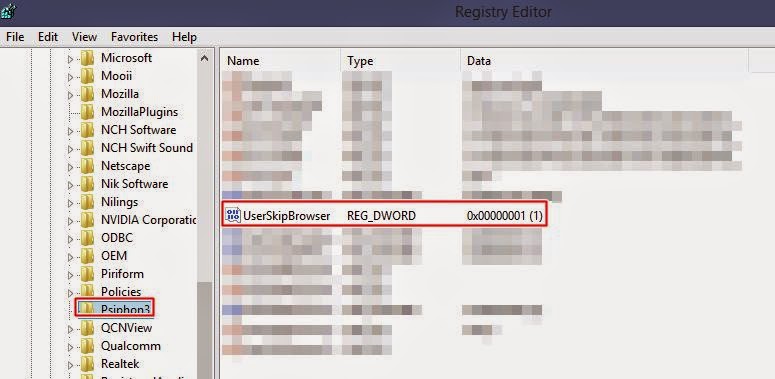
- Find and open "HKEY_CURRENT_USER\Software\Psiphon3"
- Double click the UserSkipBrowser
- Change the value into 1
edi wag mo gawing automatic set ang proxy just edit the registry anu va gamit mu na simsana matulongan niyo ako sa may alam nito ,, dahil sayang naman po ,, ito hindi ko lang nagagamit pa .. please po ...
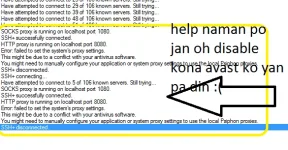
:'( about sa psiphon ko ,, disable ko na ito ,, pero yan pa din lumalabas ,, huhu,, help , me po ,,
Try this Credit to xSilent
1st Part - Disable Auto Proxy
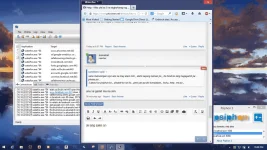
2nd Part - Remove the automatic opening of a page after connecting Psiphon 3
- Click Run, and type "regedit" to open the Registry Editor.
- Find and open "HKEY_CURRENT_USER\Software\Psiphon3", and on the right side you will see "UserSkipProxySettings".
- Set this value to 1 and Psiphon 3 will not automatically configure the system proxy settings.
failed to set system proxy
- Press Start
- Click RUN
- Search for "regedit"
- Find and open "HKEY_CURRENT_USER\Software\Psiphon3"
- Double click the UserSkipBrowser
- Change the value into 1
kuya salamat po ok na po ung psiphon ko maraming salamat po .. more power

anu va gamit mu na sim
smart bro sim
pero ok na ung psiphon ko ,, salamat sa ng best answer .. !! hehekuya Lawliet salamat po ,, ok na ung psiphon ko ..maraming salamat po ,, maasahan talga ang mga kaphc .. more power.. po ..
nicekuya salamat po ok na po ung psiphon ko maraming salamat po .. more power
smart bro sim
pero ok na ung psiphon ko ,, salamat sa ng best answer .. !! hehekuya Lawliet salamat po ,, ok na ung psiphon ko ..maraming salamat po ,, maasahan talga ang mga kaphc .. more power.. po ..

- Status
- Not open for further replies.
About this Thread
-
7Replies
-
2KViews
-
4Participants
Last reply from:
Lawliet_1
Lawliet_1
New Topics
-
Tiktok Affiliate PH kahit nasa ibang bansa
- Started by jetpo05
- Replies: 0
- ❓ Mobile Network Discussion & Support
-
Unlidata na no cap
- Started by akotaz23
- Replies: 1
- ❓ Mobile Network Discussion & Support
-
Best unli 5g promo for modem
- Started by Deathhack
- Replies: 3
- ❓ Mobile Network Discussion & Support
-
Grabe ang lala ng device pro financial Salmon
- Started by Ako_si_Joroz
- Replies: 1
- ❓ Mobile Network Discussion & Support
-
MQ-725 pocket wifi smart
- Started by Bon Nex
- Replies: 0
- ❓ Mobile Network Discussion & Support
-
Looking for unli global e sim
- Started by ryujun11
- Replies: 3
- ❓ Mobile Network Discussion & Support
-
About Creating vpn account
- Started by benseman
- Replies: 0
- ❓ Mobile Network Discussion & Support
-
SULIT NA PROMO USING VPN?
- Started by Ash2k20
- Replies: 0
- ❓ Mobile Network Discussion & Support
-
May pang extend pa ba ng promo sa globe?
- Started by Andrew west
- Replies: 0
- ❓ Mobile Network Discussion & Support
Trending Topics
-
-
-
-
Postern old vpn 2017 working on piso wifi vendo machine no hulog 2027 TCP with payload
- TEAM-FREENET
Replies: 3 -
-
-
-
-
-
Online now
- Members online
- 967
- Guests online
- 11,552
- Total visitors
- 12,519