❓ Help What videocard needed?

Status
Not open for further replies.

takagami12

Eternal Poster
mga ka PH..anu bang pinaka ok na gamitin na videocard for gaming yung kaya yung mga mabibigat na games ma offline o online man at kahit mamari ng games ay di pa rin siya mag.lalag kung maglalaro ka na?


pls help mga boss kung anu ikaka.recommend niyo at pwede yun medyo hindi naman mahal pero sulit kung gamitin ku..bibili kasi aku kaso need kupa mga opinion niyo para sure na sure aku sa bibilhin ku.
 
mga ka PH..anu bang pinaka ok na gamitin na videocard for gaming yung kaya yung mga mabibigat na games ma offline o online man at kahit mamari ng games ay di pa rin siya mag.lalag kung maglalaro ka na?


pls help mga boss kung anu ikaka.recommend niyo at pwede yun medyo hindi naman mahal pero sulit kung gamitin ku..bibili kasi aku kaso need kupa mga opinion niyo para sure na sure aku sa bibilhin ku.

takagami12 depende kasi yan sa motherboard mo. my mga compatibility kasi ang mga board and requirement. Hindi basta sinabing vediocard pwede na sa motherboard mo gamit.
Alamin mo muna ang model ng Motherboard mo.

For example:: Asrock Wolfdale1333-D667 or ECS ELITEGROUP G31T-M7.

Yan dapat ang una mong alamin din, kong maganda ang MotherBoard mo pwede ka rin mag upgrade ng magandang VideoCard for gaming.
At pag alam mo na ang MotherBoard mo message mo ako help kita if ano magandang gawin jan sa computer mo for gaming.
And depende lang din sa VideoCard if Mataas or magandang VideoCard mas mala ang price.
 
takagami12 depende kasi yan sa motherboard mo. my mga compatibility kasi ang mga board and requirement. Hindi basta sinabing vediocard pwede na sa motherboard mo gamit.
Alamin mo muna ang model ng Motherboard mo.

For example:: Asrock Wolfdale1333-D667 or ECS ELITEGROUP G31T-M7.

Yan dapat ang una mong alamin din, kong maganda ang MotherBoard mo pwede ka rin mag upgrade ng magandang VideoCard for gaming.
At pag alam mo na ang MotherBoard mo message mo ako help kita if ano magandang gawin jan sa computer mo for gaming.
And depende lang din sa VideoCard if Mataas or magandang VideoCard mas mala ang price.

brader pag yang example mo ang model ng motherboard mo mga anong video card ang ok?
 
takagami12 depende kasi yan sa motherboard mo. my mga compatibility kasi ang mga board and requirement. Hindi basta sinabing vediocard pwede na sa motherboard mo gamit.
Alamin mo muna ang model ng Motherboard mo.

For example:: Asrock Wolfdale1333-D667 or ECS ELITEGROUP G31T-M7.

Yan dapat ang una mong alamin din, kong maganda ang MotherBoard mo pwede ka rin mag upgrade ng magandang VideoCard for gaming.
At pag alam mo na ang MotherBoard mo message mo ako help kita if ano magandang gawin jan sa computer mo for gaming.
And depende lang din sa VideoCard if Mataas or magandang VideoCard mas mala ang price.

boss nandito pa kasi yung mga box niya ECS ELITEGROUP G41T-M16 boss....
Processor: Pentium(R) Dual Core CPU E6600 @ 3.06GHz 3.07 GHz
RAM : 2 gb

yan yung info ng CPU ku boss..anu po bang ma.advice mu sakin boss?
 
takagami12, kamusta ba ang result ng game jan sa CPU mo ng walang nababago? ma log ba? or di ka pa nag tatry?

nong bago pato yung Modern Warfare 2 ku hindi naman siya lag..ngaun lag na parang nadedelay na yung pag.galaw niya pero yung galaw ng naman yung sounds hindi..mula nung nag.installed aku ng Audiocity ng apps parang nabago kasi yung set-up ng Moden Warfare ku..imbis fullscreen siya dapat ngaun hindi na..parang naka.minimize nalang siya kahit anu gawin kung pag.babago sa settings hindi na talaga..ewan ku anu nang yari..basta merun na bago nung na.install ku yun..malaki pa naman yung memory ku at nag.defrag na aku kaso wala parin ng yari eh..
 
takagami12, kamusta ba ang result ng game jan sa CPU mo ng walang nababago? ma log ba? or di ka pa nag tatry?

nong bago pato yung Modern Warfare 2 ku hindi naman siya lag..ngaun lag na parang nadedelay na yung pag.galaw niya pero yung galaw ng naman yung sounds hindi..mula nung nag.installed aku ng Audiocity ng apps parang nabago kasi yung set-up ng Moden Warfare ku..imbis fullscreen siya dapat ngaun hindi na..parang naka.minimize nalang siya kahit anu gawin kung pag.babago sa settings hindi na talaga..ewan ku anu nang yari..basta merun na bago nung na.install ku yun..malaki pa naman yung memory ku at nag.defrag na aku kaso wala parin ng yari eh..
 
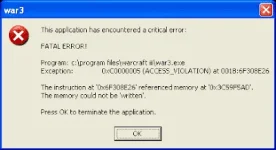
yung ibang games ok lang naman tulad ng leaf 4 dead at half life 2...pero yung leaf 4 dead 2 lag na siya..hindi niya kaya yung mga games na malalaki na ang memory...kahit ng DOTA wala aku eh..lage kasi FATAL ERROR ewan ku kung bakit gusto ku sana lagyan to ng DOTA eh.
 
kelangan mo na talaga mag upgade, punta ka nalang sa mga computer supplier, mag ask kana dun, at check mo din ang specs ng mga nilalaro mo baka naman kasi baka di kaya ng specs ng CPU mo,
 
mababa lang naman specs ng dota, mag aassemble din ako CPU for gaming eh, tas papakita ko nalang mga specs ng game na lalaruin ko dun sa supplier. para surebrad number 1 need yun video card sa games,. un ang kelangan mong bilihin, basta i base mo sa motherboard mo, baka di compatible sayang lang.
 
boss nandito pa kasi yung mga box niya ECS ELITEGROUP G41T-M16 boss....
Processor: Pentium(R) Dual Core CPU E6600 @ 3.06GHz 3.07 GHz
RAM : 2 gb

yan yung info ng CPU ku boss..anu po bang ma.advice mu sakin boss?

takagami12, Ito ang Onboard VGA ng MotherBoard mo.

Integrated Intel® Graphics Media Accelerator X4500 (GMA X4500)

Intel GMA X4500 Performance Specification::

Core Speed:: 800Mhz
Maximum Shared Memory:: 384MB
Memory Bus:: 64Bit
Texture Rate:: 3GTexel/s
Shader Processing Units:: 10
Actual Shader Performance:: 8
Direct X Supported:: DX10
Open GL:: 2.1
Resolution (WxH):: 2560x1600
Best RAM Match:: 2gb

Hindi parin sya good for gaming lalo na pag ang games mo GTA4 or higher.
kilangan mo mag add ng VideoCard or Graphics Card para kahit papano mag good perform sya ng maganda sa games.

Ito ang bilhin mo or mamili ka dito hindi ko sure ang price nito.
Sana makatulong ito info. ko kunti. Thanks.

1)) ATi Radeon HD 4670 PCI-E>>>

Manufacturer:: ATi
Series:: Radeon HD 4k
GPU:: RV730
Interface:: PCI-E 2.0X16
Core Clock Speed:: 750MHz
Sader Clock Speed:: 750MHz
Memory Clock Speed:: 1000MHz (2000DDR)
Memory Bandwidth:: 32gb/sec.
Flops:: 480Gflops
Pixel Fill Rate:: 6000 MPixels/sec
Texture Fill Rate:: 24000 MTexels/sec
Frambuffer:: 256, 512, 1024Mb
Memory Type:: GDDR3
Memory Bus Type:: 64x2 (128bit)
DirectX Compliance:: 10.1
OpenGL Compliance::2.1
Process:: 55nm


2))GeForce 9600 GT>>>

CUDA Cores1:: 64
Graphics Clock Speed:: 650MHz
Processor Clock Speed:: 1625MHz
Memory Clock Speed:: 900MHz
Standard Memory Config:: 512Mb
Memory Interface:: GDDR3
Memory Interface Width:: 256bit
Memory Bandwidth:: 57.6
DirectX Compliance:: 10.1, not sure if supported Directx11
OpenGL:: 2.1
Bus Support:: PCI-E 2.0 x16
Supported Technologies:: sli,3D Vision, PhysX, CUDA
Multi Monitor:: Yes
maximum Digital Resolution:: 2560x1600
maximum VGA Resolution:: 2048x1536
Texture Fill Rate:: 20.8 BTexels/sec

3D Vision>>>
NVIDIA 3D Vision® technology delivers stereoscopic 3D images for gamers, movie-lovers and photo enthusiasts when configured with NVIDIA GPUs, NVIDIA 3D Vision active shutter glasses, and 3D Vision-Ready display/projector. Only NVIDIA 3D Vision supports the richest array of 3D content available - more than 600 3D games, Blu-ray 3D movies, 3D photos and streaming YouTube 3D videos.


3))GeForce 9600 GSO>>>

CUDA Cores1:: 96
Graphics Clock Speed:: 550MHz
Processor Clock Speed:: 1375MHz
Memory Clock Speed:: 800MHz
Standard Memory Config:: 384Mb
Memory Interface:: GDDR3
Memory Interface Width:: 192bit
Memory Bandwidth:: 38.4
DirectX Compliance:: 10
OpenGL:: 2.1
Bus Support:: PCI-E 2.0
Supported Technologies:: CUDA, PhysX
Multi Monitor:: Yes
maximum Digital Resolution:: 2560x1600
maximum VGA Resolution:: 2048x1536
Texture Fill Rate:: 26.4 BTexels/sec

The NVIDIA® GeForce® 9600 GSO GPU offers a powerfully immersive entertainment experience designed for extreme high-definition gaming and video playback. Play the hottest DirectX 10 games with awesome speed and watch the latest HD DVD and Blu-ray movies with brilliant clarity. Featuring next generation GeForce and PureVideo® HD technologies, the GeForce 9600 GSO GPU puts amazing graphics performance within your reach.

Pero para sakin #2 GeForce 9600 GT gusto ko. 
Pero kong my budget kana rin lang yong mas maganda na jan ang bilhin mo. :)
 
brader pag yang example mo ang model ng motherboard mo mga anong video card ang ok?

Ito ang Supported na Video Card para sa Motherboard na to.
1>>>Asrock Wolfdale1333-D667 :: GDDR3
2>>>ECS ELITEGROUP G31T-M7. :: GDDR3

Parihas lang sila ng slot ng VideoCard.
Madaming klase ng VideoCard example, GDDR3, or GDDR4, or GDDR5, graphics ram memory.
My pin kasi yan slot nyan dapat sukat sa pin ng Board mo para hindi masayang ang bibilhin mong VideoCard.
 
yung ibang games ok lang naman tulad ng leaf 4 dead at half life 2...pero yung leaf 4 dead 2 lag na siya..hindi niya kaya yung mga games na malalaki na ang memory...kahit ng DOTA wala aku eh..lage kasi FATAL ERROR ewan ku kung bakit gusto ku sana lagyan to ng DOTA eh.

Ito lang ang ma aadvice ko sayo try mo to basahin para sa DoTa. :)

FATAL ERROR on Warcraft 3

Here are ways to solve Fatal Errors when you meet them:

(RAM) OR SYSTEM MEMORY

This solution is recommended for advanced users only. We have gotten reports of crashing, freezing, and memory read error messages being solved by removing bad or mismatched RAM from machines. You may want to remove one stick of RAM at a time and see if this corrects the crash. If you would like to test your RAM to make sure it is performing as it should you may want to run a RAM testing program. If you need a program to do this try doing a search on the web or consult your local computer technician. Unfortunately we cannot provide support for using these programs but they should come with well documented readme's to get you started on how to use them.<

bgwzmx.jpg.webp

Maphäçking

It is known that maphäçk causes fatal errors to Warcraft 3 randomly. Close your maphäçk and make a better gaming world for all.

Custom Map Memory Leaks

Due to the flexibility of the triggers in the Warcraft III Map Editor, it is possible to make triggers that can cause the game to crash. If you are experiencing crashing while playing a custom made map please try playing a Blizzard designed map - this will help to determine if the issue is related to the custom map or a possible conflict.

Outdated Game

Please install the latest game ρá†ch. It includes several fixes that may correct this type of error. You can ρá†ch the game by connecting to Battle.net for the auto-ρá†ch or you can download and run the stand-alone ρá†ch from the Warcraft III ρá†ch Page.

Background Applications

Usually Background applications take up a lot of memory space and causes these problems.Use Ctrl + Alt + Del and close certain programs that are not important to the Computer's security and stability.

Registry File

This solution is only for players whose Warcraft III crashes at startup.
Download You do not have permission to view the full content of this post. Log in or register now. and save it to your Windows Desktop. Once the file has been downloaded, double-click on it to import the registry info. This file will set Warcraft III to mute sound, run with the basic settings for video and set the refresh rate for the monitor to 60Hz. Once the game has started, you may select the options menu and adjust the video and sound settings as desired.

DirectX

Visit You do not have permission to view the full content of this post. Log in or register now. to check out if your video hardware is able to handle and play Warcraft III.

Sound Card Bugs

Visit You do not have permission to view the full content of this post. Log in or register now..

Video Codec Conflict

If you have installed any video codec packs, such as Nimo's Codec pack, for video editing or playback please uninstall them and try the game. These codec packs, especially ones with Divx codecs, may conflict with the video codecs inthe game causing the game to crash or not start properly.

OpenGL video softwares.

Try OpenGL or Software Transformation and Lighting (of polygons):
  1. Click Start
  2. Click Programs
  3. Click Warcraft III
  4. Right-click on the Warcraft III icon
  5. Select Properties
  6. Add -opengl to the Target field. (Example "C:\Program Files\Warcraft III\Warcraft III.exe" -opengl)
  7. Click OK and try the game again
  8. If you still experence problems repeat the above steps but replace the -opengl tag with -swtnl and try the game again.

Or punta ka dito sa site na to.
http://planetdota.phc.onl/#forbidden#/2009/02/fatal-error-on-warcraft-iii.html
 
Status
Not open for further replies.

About this Thread

  • 26
    Replies
  • 902
    Views
  • 6
    Participants
Last reply from:
jpotz

Trending Topics

Online now

Members online
528
Guests online
837
Total visitors
1,365

Forum statistics

Threads
2,272,666
Posts
28,944,457
Members
1,237,332
Latest member
poorjason
Back
Top