PH
PHShare ko lang 2 mga paps kasi nagwork sakin. Baka mg work din sa inyo.
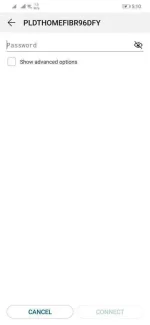
Reminder: Only for default password and connections with PLDTHOMEFIBR*****
INSTRUCTIONS:
1. Check last 5 digits of the connection.
Ex. PLDTHOMEFIBR12345
2.Multiply last 5 digits by 3.
Ex. 12345x3 = 37035
3. For the password, just add PLDTWIFI to the answer.
Ex. PLDTWIFI37035
4. Connect and enjoy!
Pls don't forget to hit like and feedback sa mga gumana.
Sana makatulong!
Reminder: Only for default password and connections with PLDTHOMEFIBR*****
INSTRUCTIONS:
1. Check last 5 digits of the connection.
Ex. PLDTHOMEFIBR12345
2.Multiply last 5 digits by 3.
Ex. 12345x3 = 37035
3. For the password, just add PLDTWIFI to the answer.
Ex. PLDTWIFI37035
4. Connect and enjoy!
Pls don't forget to hit like and feedback sa mga gumana.
Sana makatulong!