🔒 Closed [Release] Mu Server 7.x PREMIUN (Fix 2 Mounts) (Fix Cross Server Event)

Status
Not open for further replies.

Pi Sces

Forum Veteran
They are files 7.x PREMIUM Without Bugs

They can be used to create an online server.

Highlight:
  • Fix 2 Mounts
  • You can redeem codes from the game and not web
  • Includes Admin Panel and User Panel
  • DungeonExp, BloodCastle and Devil Square Work even with Rebirth 21
  • Wokrs Cross Events
  • More Things
BAWAL PALA YOUTUBE DITO :D

It includes:
  • Files
  • Web (Update, Panel Admin and Panel User)
  • Tools (Jdk, Apk Easy Tools, Navicat 12, Notepad++, Net Framewrok 4.0 and 4.7, Visual C++ 2005 to 2013 x64 - x32, DnSpy x32 - x64)

Server Configuration
(Unzip everything on Disk C)

Files:
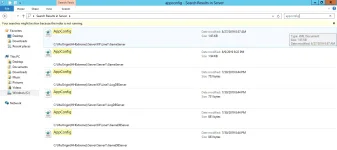
Change all ips of the appconfig.xml files
  • C:\MuOrigin(HHExtreme)\Server
Guide:
1568981354425.webp

Web:
Change all ips of the version.xml files
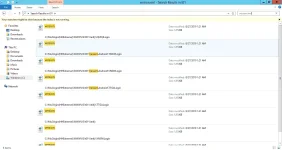
  • C:\MuOrigin(HHExtreme)\WWW\IIS\t01

Guide:

Apk: Change ips
  • APK\assets\bin\Data\Managed\Assembly-CSharp.dll
  • APK\assets\version.xml
  • APK\smali\com\kunlun\platform\android\KunlunConf$D.smali
  • APK\smali\com\kunlun\platform\android\KunlunConf$H.smali


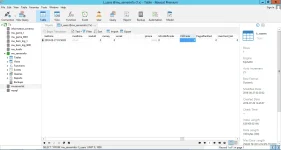
Navicat (DB):

Change ips

  • mu_game_1\mu_kuafu\t_server_info
  • mu_game_1\mu_serverdata\t_serverdata


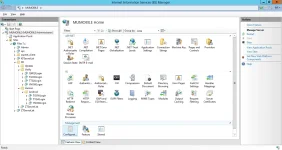
ISS (Internet Infromation Services)
Create a site on port 80, in "Physical path" Select C:\MuOrigin(HHExtreme)\WWW\IIS and in "Application Pool" select "DefaultAppPool"

Add application to folders: Admin, api, KFServerList, (in folder verify) QMQJlogin, TGGWLogin, TTGALogin, YNGWLogin, (in folder android) TGGWLogin, TGGALogin, YNGWLogin; ZTserverList, ZTServerList

Modify in Application Pools, right click on "DefaultAppPool" click on "Advanced Settings", on "Enable 32-bit app" set True
Add extension in MIME Types, File name extension * and Mime Type application / octet-stream

Guide:

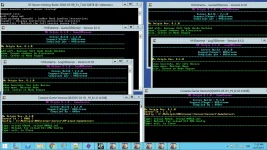
How to start to sever:
  • Run File 1. Start MySQL
  • Run File 2. Server Starter
  • Press START

More Info:
  • Password MySql: 123456 User: root
  • User: ragezone Password: ragezone from Admin Panel
  • You do not have permission to view the full content of this post. Log in or register now.
  • IP of the files 109.238.14.30
  • Server edited and tested by me
  • The GameServer.exe is not blocked :)
  • Recommended to use Windows Server R2 2012 Only on English
  • Edit the HHMod.xml file to change the game parameters


How to Make a Web Admin Account:
Create an account in the game, open Navicat, open Database mu_serverinfo, open t_user table, find the account you want to administer and change in CtrlCode 0 for 9 (the same step to make more accounts)

Guide:

More Images:

1568981489434.webp
1568981510686.webp
1568981524785.webp

Files Working:


DOWNLOADS

Files/Web/Apk
You do not have permission to view the full content of this post. Log in or register now.

Tools
You do not have permission to view the full content of this post. Log in or register now.

Fix to solve limit on creating characters
Remplace SystemParams.xml in folder GameRes/config
You do not have permission to view the full content of this post. Log in or register now.


Password: RageZone

Thanks and leave your like, it's free :)


Additional:If you have badly configured the iis and / or do not follow the steps well, it will not work !, there is no error in the files, search the forum how to configure the iis (ackemina videos) and follow the steps, the tutorial is for windows server 2012, if you try to use another OS or other programs, I will not answer the related questions.
Thanks to all who leave their likes and understand the work done to share these files.
 
They are files 7.x PREMIUM Without Bugs

They can be used to create an online server.

Highlight:
  • Fix 2 Mounts
  • You can redeem codes from the game and not web
  • Includes Admin Panel and User Panel
  • DungeonExp, BloodCastle and Devil Square Work even with Rebirth 21
  • Wokrs Cross Events
  • More Things
BAWAL PALA yôutubê DITO :D

It includes:
  • Files
  • Web (Update, Panel Admin and Panel User)
  • Tools (Jdk, Apk Easy Tools, Navicat 12, Notepad++, Net Framewrok 4.0 and 4.7, Visual C++ 2005 to 2013 x64 - x32, DnSpy x32 - x64)

Server Configuration
(Unzip everything on Disk C)

Files:
Change all ips of the appconfig.xml files
  • C:\MuOrigin(HHExtreme)\Server
Guide:


Web:
Change all ips of the version.xml files
  • C:\MuOrigin(HHExtreme)\WWW\IIS\t01

Guide:


Apk: Change ips
  • APK\assets\bin\Data\Managed\Assembly-CSharp.dll
  • APK\assets\version.xml
  • APK\smali\com\kunlun\platform\android\KunlunConf$D.smali
  • APK\smali\com\kunlun\platform\android\KunlunConf$H.smali


Navicat (DB):

Change ips

  • mu_game_1\mu_kuafu\t_server_info
  • mu_game_1\mu_serverdata\t_serverdata


ISS (Internet Infromation Services)
Create a site on port 80, in "Physical path" Select C:\MuOrigin(HHExtreme)\WWW\IIS and in "Application Pool" select "DefaultAppPool"

Add application to folders: Admin, api, KFServerList, (in folder verify) QMQJlogin, TGGWLogin, TTGALogin, YNGWLogin, (in folder android) TGGWLogin, TGGALogin, YNGWLogin; ZTserverList, ZTServerList

Modify in Application Pools, right click on "DefaultAppPool" click on "Advanced Settings", on "Enable 32-bit app" set True
Add extension in MIME Types, File name extension * and Mime Type application / octet-stream

Guide:


How to start to sever:
  • Run File 1. Start MySQL
  • Run File 2. Server Starter
  • Press START

More Info:
  • Password MySql: 123456 User: root
  • User: ragezone Password: ragezone from Admin Panel
  • You do not have permission to view the full content of this post. Log in or register now.
  • IP of the files 109.238.14.30
  • Server edited and tested by me
  • The GameServer.exe is not blocked :)
  • Recommended to use Windows Server R2 2012 Only on English
  • Edit the HHMod.xml file to change the game parameters


How to Make a Web Admin Account:
Create an account in the game, open Navicat, open Database mu_serverinfo, open t_user table, find the account you want to administer and change in CtrlCode 0 for 9 (the same step to make more accounts)

Guide:


More Images:

View attachment 689788
View attachment 689791
View attachment 689792

Files Working:


DOWNLOADS

Files/Web/Apk
You do not have permission to view the full content of this post. Log in or register now.

Tools
You do not have permission to view the full content of this post. Log in or register now.

Fix to solve limit on creating characters
Remplace SystemParams.xml in folder GameRes/config
You do not have permission to view the full content of this post. Log in or register now.


Password: RageZone

Thanks and leave your like, it's free :)


Additional:If you have badly configured the iis and / or do not follow the steps well, it will not work !, there is no error in the files, search the forum how to configure the iis (ackemina videos) and follow the steps, the tutorial is for windows server 2012, if you try to use another OS or other programs, I will not answer the related questions.
Thanks to all who leave their likes and understand the work done to share these files.
first :) try ko to paps ah, pero parang familiar sa akin, :P
pero try ko parin. :) thanks.
 
They are files 7.x PREMIUM Without Bugs

They can be used to create an online server.

Highlight:
  • Fix 2 Mounts
  • You can redeem codes from the game and not web
  • Includes Admin Panel and User Panel
  • DungeonExp, BloodCastle and Devil Square Work even with Rebirth 21
  • Wokrs Cross Events
  • More Things
BAWAL PALA yôutubê DITO :D

It includes:
  • Files
  • Web (Update, Panel Admin and Panel User)
  • Tools (Jdk, Apk Easy Tools, Navicat 12, Notepad++, Net Framewrok 4.0 and 4.7, Visual C++ 2005 to 2013 x64 - x32, DnSpy x32 - x64)

Server Configuration
(Unzip everything on Disk C)

Files:
Change all ips of the appconfig.xml files
  • C:\MuOrigin(HHExtreme)\Server
Guide:


Web:
Change all ips of the version.xml files
  • C:\MuOrigin(HHExtreme)\WWW\IIS\t01

Guide:


Apk: Change ips
  • APK\assets\bin\Data\Managed\Assembly-CSharp.dll
  • APK\assets\version.xml
  • APK\smali\com\kunlun\platform\android\KunlunConf$D.smali
  • APK\smali\com\kunlun\platform\android\KunlunConf$H.smali


Navicat (DB):

Change ips

  • mu_game_1\mu_kuafu\t_server_info
  • mu_game_1\mu_serverdata\t_serverdata


ISS (Internet Infromation Services)
Create a site on port 80, in "Physical path" Select C:\MuOrigin(HHExtreme)\WWW\IIS and in "Application Pool" select "DefaultAppPool"

Add application to folders: Admin, api, KFServerList, (in folder verify) QMQJlogin, TGGWLogin, TTGALogin, YNGWLogin, (in folder android) TGGWLogin, TGGALogin, YNGWLogin; ZTserverList, ZTServerList

Modify in Application Pools, right click on "DefaultAppPool" click on "Advanced Settings", on "Enable 32-bit app" set True
Add extension in MIME Types, File name extension * and Mime Type application / octet-stream

Guide:


How to start to sever:
  • Run File 1. Start MySQL
  • Run File 2. Server Starter
  • Press START

More Info:
  • Password MySql: 123456 User: root
  • User: ragezone Password: ragezone from Admin Panel
  • You do not have permission to view the full content of this post. Log in or register now.
  • IP of the files 109.238.14.30
  • Server edited and tested by me
  • The GameServer.exe is not blocked :)
  • Recommended to use Windows Server R2 2012 Only on English
  • Edit the HHMod.xml file to change the game parameters


How to Make a Web Admin Account:
Create an account in the game, open Navicat, open Database mu_serverinfo, open t_user table, find the account you want to administer and change in CtrlCode 0 for 9 (the same step to make more accounts)

Guide:


More Images:

View attachment 689788
View attachment 689791
View attachment 689792

Files Working:


DOWNLOADS

Files/Web/Apk
You do not have permission to view the full content of this post. Log in or register now.

Tools
You do not have permission to view the full content of this post. Log in or register now.

Fix to solve limit on creating characters
Remplace SystemParams.xml in folder GameRes/config
You do not have permission to view the full content of this post. Log in or register now.


Password: RageZone

Thanks and leave your like, it's free :)


Additional:If you have badly configured the iis and / or do not follow the steps well, it will not work !, there is no error in the files, search the forum how to configure the iis (ackemina videos) and follow the steps, the tutorial is for windows server 2012, if you try to use another OS or other programs, I will not answer the related questions.
Thanks to all who leave their likes and understand the work done to share these files.
paaano setup ginawa mo dito paps? virtual os? o direct client? kasi naka windows server based dapat? thanks.
 
saka pala, may tutorial ba para sa pag cchange ip sa apk?
anong tools mo para dito?
 
Apk: Change ips
  • APK\assets\bin\Data\Managed\Assembly-CSharp.dll
  • APK\assets\version.xml
  • APK\smali\com\kunlun\platform\android\KunlunConf$D.smali
  • APK\smali\com\kunlun\platform\android\KunlunConf$H.smali

gawa ka tutorial para dito paps ah, hindi to makukuha ng ibang magttry din,
kung ako aware ako pero need ko ng procedure sayo kasi once lang ako nakapag compile ng apk via apktool sa android,
pero hindi sa pc. thanks.,
 
Status
Not open for further replies.

About this Thread

  • 21
    Replies
  • 1K
    Views
  • 13
    Participants
Last reply from:
Pi Sces

Online now

Members online
338
Guests online
619
Total visitors
957

Forum statistics

Threads
2,274,598
Posts
28,957,121
Members
1,234,339
Latest member
Madimetja
Back
Top