PH
PHtry mo install tong attachment kong Go Launcher at Go Launcher Fonts. old version pero stable. yan ang gamit ko upto now.
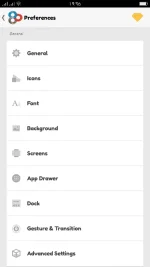
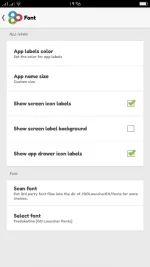
Steps:
1. Install both apks
2. Open Go Launcher Preferences (varies sa phone kung pano iopen. sa oppo f3 ko hold the screen when on wallpaper mode.)
3. Pagkaopen ng Preferences, makikita mo ung Font... tap mo...
4. Click Scan Font... wait to finish then click ok
5. Tap Select font at un na. pili ka na ng mga fonts na gusto mo.
You do not have permission to view the full content of this post. Log in or register now. (Go Launcher)
You do not have permission to view the full content of this post. Log in or register now. (Go Launcher Fonts)
_kleo_
Avinzon
sa ibang gusto rin magtry... at nagustuhan... pakihit lang ng like button.
Steps:
1. Install both apks
2. Open Go Launcher Preferences (varies sa phone kung pano iopen. sa oppo f3 ko hold the screen when on wallpaper mode.)
3. Pagkaopen ng Preferences, makikita mo ung Font... tap mo...
4. Click Scan Font... wait to finish then click ok
5. Tap Select font at un na. pili ka na ng mga fonts na gusto mo.
You do not have permission to view the full content of this post. Log in or register now. (Go Launcher)
You do not have permission to view the full content of this post. Log in or register now. (Go Launcher Fonts)
_kleo_
Avinzon
sa ibang gusto rin magtry... at nagustuhan... pakihit lang ng like button.