PH
PHFirst : gawa ka dito ng account You do not have permission to view the full content of this post.
Log in or register now./
or any SSL website
<Sample Account>
Host: You do not have permission to view the full content of this post. Log in or register now. / You do not have permission to view the full content of this post. Log in or register now.
Username:You do not have permission to view the full content of this post. Log in or register now.-artstut
Password: ArtsTut
OpenSSH: 22
Dropbear:80
Stunnel:443, 444
Udpgw Port: 7300 (For online games and video/voice calls)
Created date: 12-Sep-2019
Expired date: 19-Sep-2019
</Sample Account>
Next Copy Host Then Convert mo to DNS here You do not have permission to view the full content of this post. Log in or register now./
Sa Ip ilagay Nyo Yung Host ng Ginawa nyong Account then sa Host ng DNS ilagay Nyo ==>You do not have permission to view the full content of this post. Log in or register now. <== then create na
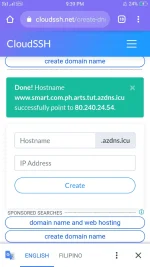
Example of DNS
You do not have permission to view the full content of this post. Log in or register now. point to You do not have permission to view the full content of this post. Log in or register now.
Import to VPN
Host Name: You do not have permission to view the full content of this post. Log in or register now.
Port : 443
then username at password
Sa SNI ilagay nyo You do not have permission to view the full content of this post. Log in or register now.
Then Start The VPN
#Ingat Sa Smart Blocking
or any SSL website
<Sample Account>
Host: You do not have permission to view the full content of this post. Log in or register now. / You do not have permission to view the full content of this post. Log in or register now.
Username:You do not have permission to view the full content of this post. Log in or register now.-artstut
Password: ArtsTut
OpenSSH: 22
Dropbear:80
Stunnel:443, 444
Udpgw Port: 7300 (For online games and video/voice calls)
Created date: 12-Sep-2019
Expired date: 19-Sep-2019
</Sample Account>
Next Copy Host Then Convert mo to DNS here You do not have permission to view the full content of this post. Log in or register now./
Sa Ip ilagay Nyo Yung Host ng Ginawa nyong Account then sa Host ng DNS ilagay Nyo ==>You do not have permission to view the full content of this post. Log in or register now. <== then create na
Example of DNS
You do not have permission to view the full content of this post. Log in or register now. point to You do not have permission to view the full content of this post. Log in or register now.
Import to VPN
Host Name: You do not have permission to view the full content of this post. Log in or register now.
Port : 443
then username at password
Sa SNI ilagay nyo You do not have permission to view the full content of this post. Log in or register now.
Then Start The VPN
#Ingat Sa Smart Blocking