🔒 Closed Patulong po sa pagupdate ng iphone 6s

Status
Not open for further replies.

Blackshadow28

Eternal Poster
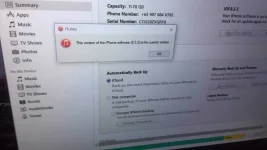
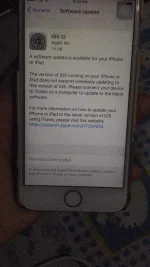
Paano po gagawin po sa iphone 6s hindi po maupdate ng ios 12 version pero meron nakalagay na update hindi nga lang maclick yung download and install nakalagay update daw sa itunes pero nagcheck naman ako ng update sa itunes latest version na daw yung gamit ko ios 9 version palang sakin matagal na kasi hindi naupdate nakaoff kasi yung auto update nya
Pacheck nalang po sa photo
Salamat po sa makakatulong
 

Attachments

  • 3CAF7D79-0636-4C6D-A549-AD0B9A8C6439.webp
    3CAF7D79-0636-4C6D-A549-AD0B9A8C6439.webp
    152 KB · Views: 14
  • 2F3C709A-C6C7-408E-BF67-764FA11A8539.webp
    2F3C709A-C6C7-408E-BF67-764FA11A8539.webp
    244.8 KB · Views: 12
Lumalabas lates ios version na daw yung ios 9 kapag nagcheck ako sa itunes hindi din sya lumalabas yung update ng ios 12
hindi ts si itunes app ang e update mo or redownload yung lates version ng itunes at install baka kasi nag error lang siya. Unusual para sa isang iphone lalo na sa 6s,
 
try mo manual update download ka muna ng .ipsw
sa You do not have permission to view the full content of this post. Log in or register now.

How to Use .IPSW
  1. Connect your iPhone or otheriOS device to your computer;
  2. Choose a device in iTunes;
  3. In macOS, hold the “Option” key, and then click “Refresh”.
  4. On a PC, hold the “SHIFT” key and then click “Refresh”;
  5. Select the downloaded .IPSW file and click “Select”.
  6. Let iOS device update as usual.
 
Status
Not open for further replies.

About this Thread

  • 6
    Replies
  • 703
    Views
  • 4
    Participants
Last reply from:
Blackshadow28

Online now

Members online
369
Guests online
630
Total visitors
999

Forum statistics

Threads
2,274,606
Posts
28,957,170
Members
1,234,347
Latest member
Ynotzai
Back
Top