 PH
PHInternet Explorer Chan
Honorary Poster
sa mga nag hahanap ng gamebooster for PC ito gamit ko
You do not have permission to view the full content of this post. Log in or register now. download link via Dropmb
Extra info: close nyo muna yung app bago gawin yung tips
Tips for bypassing login screen
1. After nyo e install go to file location folder.
2. Look for the file name RzCommon.dll and delete the file.
3. Open Razen Game Booster.
4.pag lumitaw to continue application lang.
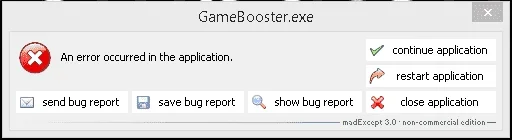
5. Good to go kana!
Ito settings ko sa configure setting. Launcher>configure
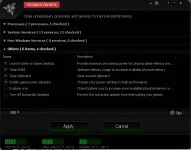
Check lahat mula sa processes, system services, non-windows services,others except sa Explorer.exe at windows update.
ikaw na bahala kung gusto mo e check lahat basta alam mo ginagawa mo.
Last tips: press Ctrl+Alt+R para balik sa Normal mode.
You do not have permission to view the full content of this post. Log in or register now. download link via Dropmb
Extra info: close nyo muna yung app bago gawin yung tips
Tips for bypassing login screen
1. After nyo e install go to file location folder.
2. Look for the file name RzCommon.dll and delete the file.
3. Open Razen Game Booster.
4.pag lumitaw to continue application lang.
5. Good to go kana!
Ito settings ko sa configure setting. Launcher>configure
Check lahat mula sa processes, system services, non-windows services,others except sa Explorer.exe at windows update.
ikaw na bahala kung gusto mo e check lahat basta alam mo ginagawa mo.
Last tips: press Ctrl+Alt+R para balik sa Normal mode.

