PH
PHHello guys, Eto na yung pinakahihintay ng lahat na maibalik yung HFR mode sa mga unit nyo. I'm sure na working to sa lahat kase gumana sa akin. Follow nyo lang ang steps sa ibaba. Ginawan ko nalang ng tutorial kase bawal ang youtube link.
Eto naa, simula na tayo. sobrang easy lang talaga (kahit bata kayang gawin to )
)
Requirements:
Brain.apk
Wag pabebe.apk
1.Go to File Manager>Internal storage>Android>Data>com.mobile.legends
2.Copy the dragon2017 folder to SD Card (wait until finished)
W A R N I N G !
Before mo euninstall yung ML sa playstore make sure na naka bind na ang account mo sa moonton kase sa trick nato di ka makakalogin via google/facebook
3.Punta ka sa playstore, search mo ML then uninstall.
4.After mauninstall, punta ka sa options ng google play at click mo Play protect at eoff mo yung Scan device for security threats.
5.Download mo tong nasa ibaba
Download Link: (Legit ML APK)
Mobile Legends Unity Apk: You do not have permission to view the full content of this post. Log in or register now.
Cloning App: You do not have permission to view the full content of this post. Log in or register now.
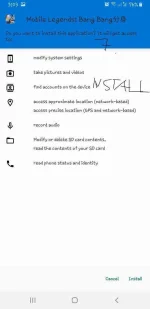
6. After mo nadownload yung Unity APK, install mo lang at eallow ang lahat ng permission na need nya.
Magdodownload ng update sa KOF kase Lylia ρá†ch pa ang APK nato. Hintayin lang matapos. May lalabas na " Update Done, Please restart the game" click mo yun.
7.Open mo yung game at hayaan mo ang game na lumabas yung downloading resources at make sure na maskip mo yung tutorial at malogin ka sa account mo either moonton/smurf o any, after. Quit mo yung game.
8.Yung dragon2017 file na kinopy mo sa SD Card lagay mo ulit sa Internal storage>Android>Data>com.mobile.legends para di na magdownload ulit ng resources.
9.Open mo yung ML at hintayin ang update/installation.
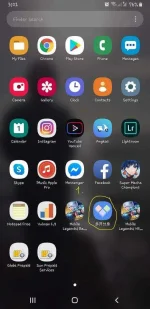
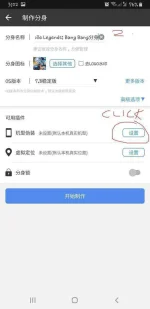
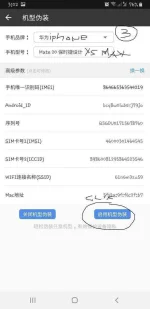
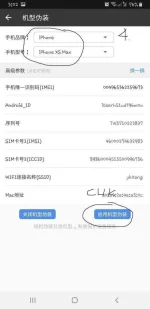
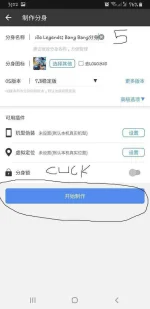
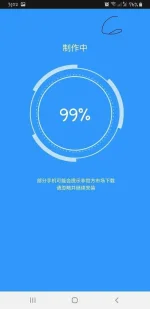
10.Download mo yung cloning app at einstall mo. (siguro alam nyo na kung pano. If hindi provide ako ng video) ang app ay hihingi ng permission kaya allow mo nalang.
Tutorial: Makentosh/iCodix
Credits: Fadli Erbakan (Salute to this guy)
S C R E E N S H O T S : nasa ibaba
Eto naa, simula na tayo. sobrang easy lang talaga (kahit bata kayang gawin to
)Requirements:
Brain.apk
Wag pabebe.apk
1.Go to File Manager>Internal storage>Android>Data>com.mobile.legends
2.Copy the dragon2017 folder to SD Card (wait until finished)
W A R N I N G !
Before mo euninstall yung ML sa playstore make sure na naka bind na ang account mo sa moonton kase sa trick nato di ka makakalogin via google/facebook
3.Punta ka sa playstore, search mo ML then uninstall.
4.After mauninstall, punta ka sa options ng google play at click mo Play protect at eoff mo yung Scan device for security threats.
5.Download mo tong nasa ibaba
Download Link: (Legit ML APK)
Mobile Legends Unity Apk: You do not have permission to view the full content of this post. Log in or register now.
Cloning App: You do not have permission to view the full content of this post. Log in or register now.
6. After mo nadownload yung Unity APK, install mo lang at eallow ang lahat ng permission na need nya.
Magdodownload ng update sa KOF kase Lylia ρá†ch pa ang APK nato. Hintayin lang matapos. May lalabas na " Update Done, Please restart the game" click mo yun.
7.Open mo yung game at hayaan mo ang game na lumabas yung downloading resources at make sure na maskip mo yung tutorial at malogin ka sa account mo either moonton/smurf o any, after. Quit mo yung game.
8.Yung dragon2017 file na kinopy mo sa SD Card lagay mo ulit sa Internal storage>Android>Data>com.mobile.legends para di na magdownload ulit ng resources.
9.Open mo yung ML at hintayin ang update/installation.
10.Download mo yung cloning app at einstall mo. (siguro alam nyo na kung pano. If hindi provide ako ng video) ang app ay hihingi ng permission kaya allow mo nalang.
Tutorial: Makentosh/iCodix
Credits: Fadli Erbakan (Salute to this guy)
S C R E E N S H O T S : nasa ibaba