 PH
PHStep 1 Create a new document, apply a Layer Style on the background layer. Add a Gradient Overlay and a Pattern Overlay. 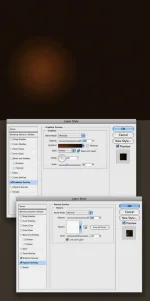 Step 2 Here I’ve used an icon I found on a cool site, but you can use whatever you want.
  Step 3 Select the Ellipse Tool (U) and create a shape like I did. After that apply a Gaussian Blur (Filter>Blur>Gaussian Blur) with radius of 30px.
 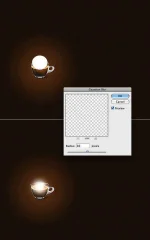 Step 4 Create a new Folder name it “Light Effects”. Change its blend mode to Color Dodge, and move the ellipse you created to this folder.
 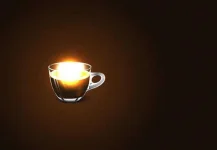 Step 5 In order to create the sparks we will use the amazing brush engine. Add a new layer, inside the “Light Effects” layer, set white for the color and follow the images below.
 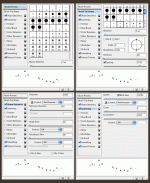 Step 6 Using the Layer Styles add a Outer Glow to the sparks
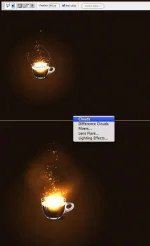
 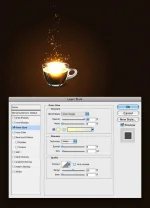 Step 7 Lets add some smoke. Create a new Layer, call it “Smoke”. Change its blend mode to Color Dodge and select the Lasso Tool. Set 40px for Feather and create a selection like I did below. After that make sure that the foreground is white and the background is black and apply a Filter>Render>Clouds. Tip: Continue applying the filter until you get the best clouds.
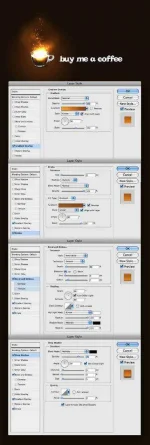
  Step 8 Add some text and using the Layer Styles again lets create a nice effect.
  Step 9 Place your logo and you can even add more effects like I did on the Magic Lighting Effect, but then you will have to follow that tutorial
  .
.  Conclusion I have to say, if you know a bit of Layer Styles and the Brush engine in Photoshop you will be able to create amazing effects. It will depend exclusively on your imagination and playing with the tool. Sometimes just changing a some settings and you get a totally different effect.
Step 2 Here I’ve used an icon I found on a cool site, but you can use whatever you want. Step 3 Select the Ellipse Tool (U) and create a shape like I did. After that apply a Gaussian Blur (Filter>Blur>Gaussian Blur) with radius of 30px. Step 4 Create a new Folder name it “Light Effects”. Change its blend mode to Color Dodge, and move the ellipse you created to this folder. Step 5 In order to create the sparks we will use the amazing brush engine. Add a new layer, inside the “Light Effects” layer, set white for the color and follow the images below. Step 6 Using the Layer Styles add a Outer Glow to the sparks Step 7 Lets add some smoke. Create a new Layer, call it “Smoke”. Change its blend mode to Color Dodge and select the Lasso Tool. Set 40px for Feather and create a selection like I did below. After that make sure that the foreground is white and the background is black and apply a Filter>Render>Clouds. Tip: Continue applying the filter until you get the best clouds. Step 8 Add some text and using the Layer Styles again lets create a nice effect. Step 9 Place your logo and you can even add more effects like I did on the Magic Lighting Effect, but then you will have to follow that tutorial . Conclusion I have to say, if you know a bit of Layer Styles and the Brush engine in Photoshop you will be able to create amazing effects. It will depend exclusively on your imagination and playing with the tool. Sometimes just changing a some settings and you get a totally different effect.
