PH
PHPHC-Kagura
Elite
pano istop ung windows 10 auto aupdate? d na kasi pwede i stop sa service e any otherway?
d stable yan sir nag uupdate parin sya yan nka lagay na sa post ko yan e pero thanks sirYou do not have permission to view the full content of this post. Log in or register now.
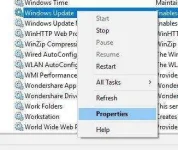
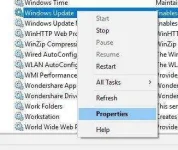
Step 1: Go to Control Panel > Administrative Tools > Services.
In the Services window, scroll down and select Windows Update.
Step 2: Right-click and select Properties.
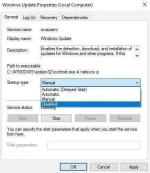
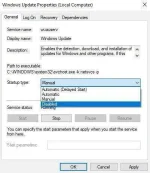
Step 3: Under the General tab > Startup Type, select disabled. That will take care of Windows Updates not being installed on your machine.
from: You do not have permission to view the full content of this post. Log in or register now.
baka gumana sayo to ts:d stable yan sir nag uupdate parin sya yan nka lagay na sa post ko yan e pero thanks sir