PH
PHQR Code UPDATED: 09/17/2019
Promo requred:
SUN TU Promos
STEPS:
1. Go to AppStore and download the "Potatso Lite" app.

2. Import the following SSR Proxy Server/s by
A) Scanning each of the QR Code/s below

B) or Save the QR Code/s in your phone and import as image file (refer to the picture below)
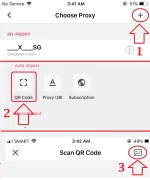
3. Choose an SSR Proxy then Connect.
QR code/s:
This SSR Server credited to DummyAsk
Added: Sept. 17


Added: Sept. 17 from fanqiang.network

Potatso LITE Features:
Promo requred:
SUN TU Promos
STEPS:
1. Go to AppStore and download the "Potatso Lite" app.
2. Import the following SSR Proxy Server/s by
A) Scanning each of the QR Code/s below
B) or Save the QR Code/s in your phone and import as image file (refer to the picture below)
3. Choose an SSR Proxy then Connect.
QR code/s:
This SSR Server credited to DummyAsk
Added: Sept. 17
Added: Sept. 17 from fanqiang.network
Potatso LITE Features:
- Custom proxy supports Shadowsocks, ShadowsocksR, HTTP and Socks5
- Both cellular and Wi-Fi are supported
- Supports download and update of apps in AppStore.
- Custom DNS support.