🔒 Closed [HELP] How to change 100Mbps Network Speed to 1Gigabit

Status
Not open for further replies.

Pwnthis

Eternal Poster
🆘🆘 Good day mga kaPHC, baka may makatulong. 🆘🆘
May tinetest kasi akong speed, dahil kalalagay lang ng internet namin at dapat ang speed na matest ko is 150Mbps.
pero dahil lock sya sa 100Mbps hindi ko maconfirm kung sagad ba yung nakukuha kong bandwidth.


Already change the "Speed & duplex" to 1.0 Gbps Full Duplex
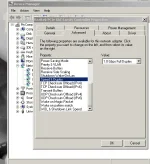
speedduplex.webp


But yung status nya sa Local Area ay naka 100Mbps parin
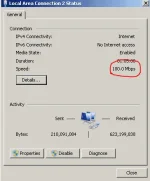
status.webp


any idea guys?
hindi ko pa sure kung yung modem ang nag lilimit ng speed, hindi ko pa kasi cinoconfigure baka kung ano mapalitan ko
wala pa akong pang contact sa ISP.

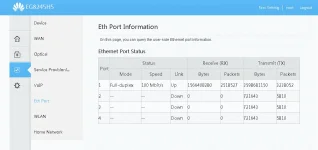
yung status ko naman dun sa modem naka 100Mbps din
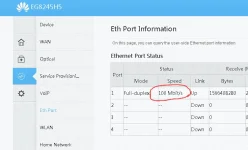
1565949431620.webp


Salamat sa mga sasagot! (y)
 

Attachments

  • 1565949406408.webp
    1565949406408.webp
    77.7 KB · Views: 25
As per screen shot, gigabit ethernet yung NIC mo pero 100mbps lang yung current speed.

Your cable needs to be at least cat5e. Is your PC connected to a switch which only supports 100mbps? If yes, then nothing you can do about it except replacing the switch that supports gigabit, or; connect directly to your modem/router (presuming it supports gigabit).

Another thing you can do is boot a Linux LiveCd and check the speed from there.
 
Status
Not open for further replies.

About this Thread

  • 3
    Replies
  • 292
    Views
  • 3
    Participants
Last reply from:
homer_simpson

Trending Topics

Online now

Members online
1,111
Guests online
1,549
Total visitors
2,660

Forum statistics

Threads
2,285,714
Posts
29,032,610
Members
1,218,559
Latest member
Dusoy109
Back
Top