PH
PHPHC_Incognito
Forum Veteran
Configurations:
1. on your PC, click "Open Network and sharing center"
2.Click "Setup New Connections or Network"
3.Connect to a Work Place, then click "Next"
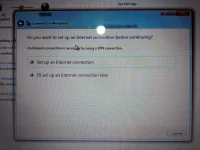
4.Click "Use my Internet Connection (VPN)"
5. Put your Server IP Address ( Para mag work sa SMart,tnt, Sun, Use DNS method or Tricks... )
6. Check the box sa baba ( Dont Connect Now, just setup so i can connect later) the click "Next"
7. Input your vpn account user name and password (Check nyo na rin yung remember password).
8.then Close.. NOTE wag nyo muna e connect..)
9. Go to Network and Sharing Center and click "Change Adapter Settings"
May na dagdag na "VPN Connections"
10. Right Click 'VPN Connections" and select properties"
11. Select Security Tab and choose ("Layer 2 Tunneling Protocol with IPsec (L2TP/IPSec)" ) then click "Advanced Settings".. and input your Preshared Key Authentication
12. CONNECT VPN SERVER
1. on your PC, click "Open Network and sharing center"
2.Click "Setup New Connections or Network"
3.Connect to a Work Place, then click "Next"
4.Click "Use my Internet Connection (VPN)"
5. Put your Server IP Address ( Para mag work sa SMart,tnt, Sun, Use DNS method or Tricks... )
6. Check the box sa baba ( Dont Connect Now, just setup so i can connect later) the click "Next"
7. Input your vpn account user name and password (Check nyo na rin yung remember password).
8.then Close.. NOTE wag nyo muna e connect..)
9. Go to Network and Sharing Center and click "Change Adapter Settings"
May na dagdag na "VPN Connections"
10. Right Click 'VPN Connections" and select properties"
11. Select Security Tab and choose ("Layer 2 Tunneling Protocol with IPsec (L2TP/IPSec)" ) then click "Advanced Settings".. and input your Preshared Key Authentication
12. CONNECT VPN SERVER