PH
PHsl4yer1000
Established
Hi, share ko lang etong trick ko sa pag linis ng temp,prefetch, %temp% mga junk files no need app or search that junk
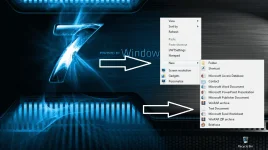
Copy that code below > create new text file > paste this code and save as Anyname.bat sa desktop nyo lagay.
Para di nyo na kelangan pasukin isa isa mga yan para mag delete just click lang ang bat ubos lahat ng junk .
idkit nyo yung "@" at "echo" pag paste nyo di ko kasi madikit dito kasi nag tatag ng name
@ echo off
del /s /f /q c:\windows\temp\.
rd /s /q c:\windows\temp
md c:\windows\temp
del /s /f /q C:\WINDOWS\Prefetch
del /s /f /q %temp%\.
rd /s /q %temp%
md %temp%
deltree /y c:\windows\tempor~1
deltree /y c:\windows\temp
deltree /y c:\windows\tmp
deltree /y c:\windows\ff*.tmp
deltree /y c:\windows\prefetch
deltree /y c:\windows\history
deltree /y c:\windows\cookies
deltree /y c:\windows\recent
deltree /y c:\windows\spool\printers
cls
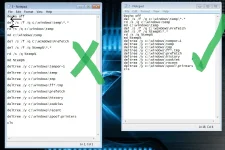
Just remove space nlang sa code guys see image attached nlang my space kasi between nextline ng code pag pinaste mo just delete lang .
Kahit e open mo yung prefetch, %temp% bago nyo e click ang bat file makikita nyo pano nya e delete ang junk . yan lang thankyou!
Copy that code below > create new text file > paste this code and save as Anyname.bat sa desktop nyo lagay.
Para di nyo na kelangan pasukin isa isa mga yan para mag delete just click lang ang bat ubos lahat ng junk .
idkit nyo yung "@" at "echo" pag paste nyo di ko kasi madikit dito kasi nag tatag ng name
@ echo off
del /s /f /q c:\windows\temp\.
rd /s /q c:\windows\temp
md c:\windows\temp
del /s /f /q C:\WINDOWS\Prefetch
del /s /f /q %temp%\.
rd /s /q %temp%
md %temp%
deltree /y c:\windows\tempor~1
deltree /y c:\windows\temp
deltree /y c:\windows\tmp
deltree /y c:\windows\ff*.tmp
deltree /y c:\windows\prefetch
deltree /y c:\windows\history
deltree /y c:\windows\cookies
deltree /y c:\windows\recent
deltree /y c:\windows\spool\printers
cls
Just remove space nlang sa code guys see image attached nlang my space kasi between nextline ng code pag pinaste mo just delete lang .
Kahit e open mo yung prefetch, %temp% bago nyo e click ang bat file makikita nyo pano nya e delete ang junk . yan lang thankyou!